
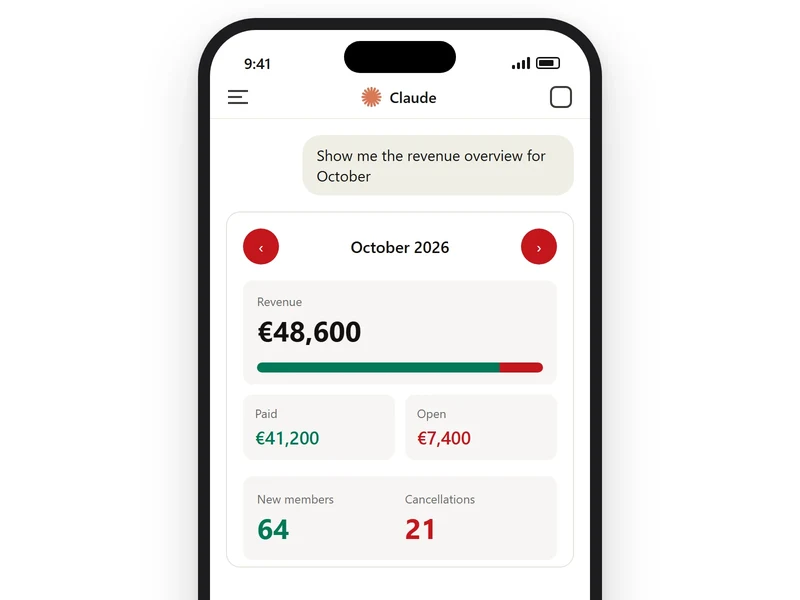
A phone shows the October revenue view in the Claude chat with paid and open amounts and arrows to the next month

MCP Apps for Your Apps

Each of your apps gets its own MCP App: a view Claude opens in the chat, at the desk or on the phone. A month’s revenue with its paid and open amounts fits on one screen, one tap from the next month. A form collects structured input, calls the app’s tools and tells Claude what happened.

In a meeting room a pen points at the query and last refresh line under a chart of bookings by region

Dashboards From Your Data

Your data platforms are connected to Claude, such as Snowflake, Databricks, BigQuery or Salesforce. A question in plain words becomes a live dashboard that stays current as the data changes. Every chart shows its query and its last refresh, so each figure in a meeting traces to its source.
A laptop in a hotel lounge shows a Teams meeting summary, a follow-up mail and Claude asking to confirm before sending it

Microsoft 365 With Work IQ

Work IQ is set up in your own Microsoft 365 tenant and connected to Claude. Mail, calendar, Teams chats, files, lists and meeting transcripts then come within Claude’s reach, under each person’s own permissions. Claude asks for a person’s confirmation before it sends a mail or changes a list item.

Your Business Data in Claude

MCP Apps for Your Apps 3 steps
01

A View for Each App

Each app gets views for the work that keeps coming back, such as the figures of a month, a search or the review of new entries. The app's MCP server delivers the view together with the tool result. Claude shows it in a shielded frame right in the chat.
02

Forms for Structured Input

A form shows every field, option and default on one screen and checks the entries before they are sent. A click hands them to the app's tools. The view then tells Claude what happened, so the conversation continues from the result.
03

Data Kept on the App's Server

Whatever a view shows is kept on the app's MCP server, so every view reads from the same source as the app. When a conversation is reopened later, Claude rebuilds the view with the figures the app holds at that moment.
Dashboards From Your Data 3 steps
04

Your Data Platforms Connected

The data platforms the company runs are connected to Claude: a warehouse such as Amazon Redshift, BigQuery, ClickHouse, Databricks or Snowflake, or an app such as Salesforce. Each dashboard names the table or app where its data lives, so every chart starts at the right source.
05

Dashboards From a Question

A question in plain words, such as which region booked the most this quarter, becomes a live dashboard. Every chart shows the query behind it and when its data was last refreshed. A follow-up like a filter for region updates the charts and their queries together.
06

Private Until Shared

Dashboards are switched on for the organisation as part of the setup. A new dashboard starts private to the person who asked for it and opens to colleagues with one click on Share. Each colleague then sees it through their own connected apps.
Microsoft 365 With Work IQ 3 steps
07

Work IQ in Your Tenant

Work IQ is set up once in the company's own Microsoft 365 tenant: an administrator registers it, each person gives consent, and usage is billed with a monthly limit and alerts. Claude connects to it through the Work IQ MCP server.
08

Mail, Meetings, Files and Lists

Mail, calendar, Teams chats and channels, files, SharePoint sites and lists, tasks and meeting transcripts come within Claude's reach, along with who works with whom. Every request runs under the signed-in person's own permissions, so each answer holds what that person may open.
09

A Person Confirms Every Write

Claude reads mail, meetings and files for every answer and asks before it sends a mail, changes a list item or moves a file. The confirmation comes in the message that asks for it, one action at a time, so every change in the tenant has a person behind it.

Frequently Asked Questions

What are MCP Apps?
MCP Apps is an extension of the Model Context Protocol, the open standard Claude uses to work with the tools of other applications. With it, a tool brings its own interactive view, such as a month's figures, a form or a dashboard, and Claude shows it right in the chat. The view calls the app's tools itself, loads new data and tells Claude what happened inside it.
Can an MCP App be built for our own software?
Yes, for any application that has an MCP server or gets one built. The first views go to the work your employees repeat most often in the chat, counted from the tool calls the server records. The existing tools keep serving Claude Code, which calls the same tool and receives its result as text.
What are Claude Dashboards?
Claude Dashboards turns a question in plain words into a dashboard built on the company's live data. Claude writes a query for each chart and runs it, and every chart shows that query and when its data was last refreshed. The dashboards stay current as the data changes. A new dashboard is private to the person who asked for it until they share it.
How does Claude reach Microsoft 365 through Work IQ?
Work IQ is Microsoft's layer over the mail, calendars, chats and files of a Microsoft 365 tenant. It is set up once in the company's own tenant, with a registration by an administrator, each person's consent and a spending policy with a monthly limit and alerts. Claude connects to it through the Work IQ MCP server. Every request runs under the signed-in person's own permissions, and Claude asks before it sends a mail or changes a list item.