
Optimizing Agentic SW Engineering With Mods

Mods give your team control over every action the agent takes
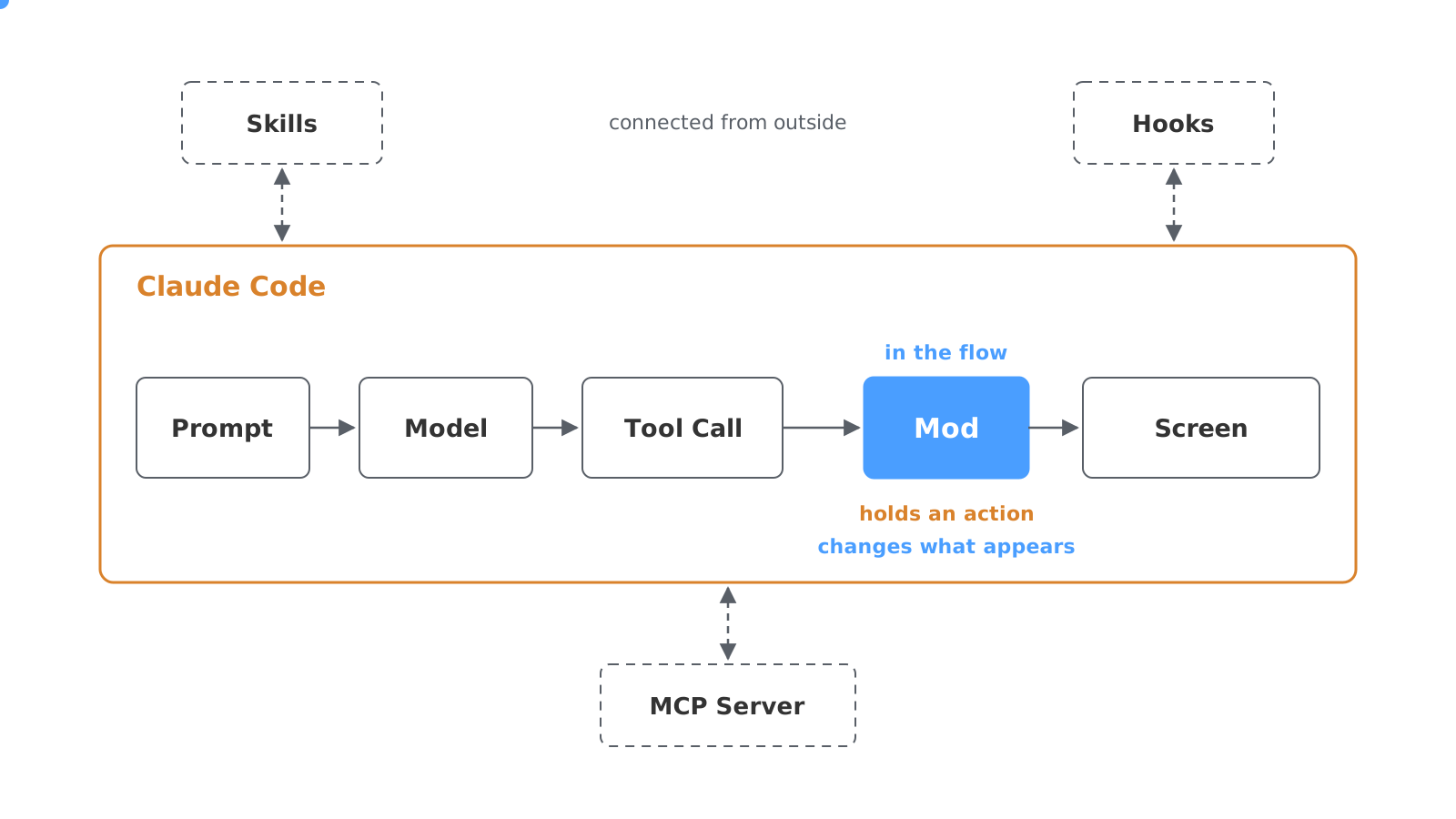
Anthropic introduced mods on 1 October 2026. A mod receives every event in the session at the moment it happens: every prompt sent, every tool call, the start and end of every response, every slash command, and the start and end of the session. A tool call is an action by the agent, such as a shell command or a file change.
A mod can react to every event. It watches what happens in the session, changes what Claude Code does next, or draws its own display: in the status line at the bottom, in a band directly above the prompt, in a pane beside the conversation, as a toast (a short pop-up notice), or through its own slash command.
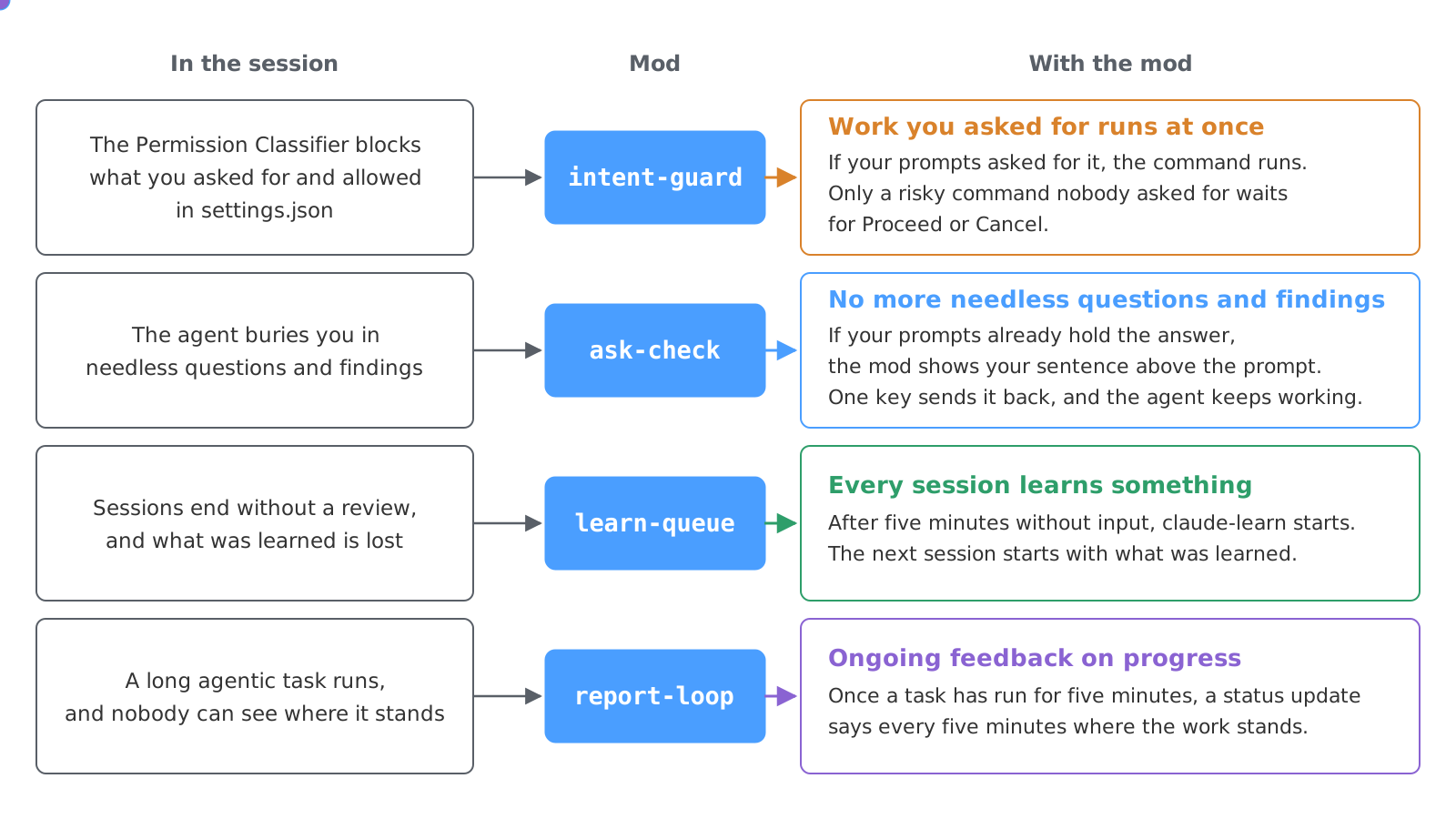
The integrations.at harness runs intent-guard, ask-check, learn-queue and report-loop, among others. Each one reacts to a different event in the session.
As a mod, a team rule applies on every machine, even when the model overlooks it
The harness includes the rules, the skills, the permissions, the hooks and now the mods. Rules are written instructions in the CLAUDE.md file, which Claude Code loads into the context at the start of every session. Skills are stored instructions the agent loads when it needs them. Permissions set what the agent may do without asking, and hooks are scripts that run on certain events. Whether the agent follows them is up to the model. A mod is code and runs on every event it is registered for, whatever the model happens to be paying attention to.
In its guide, Anthropic shows three mods for three areas of use. Token Weather is a mod for visibility. Above the prompt, it shows as a small weather forecast how full the context window is: the memory the model has in this session for code, conversation and results. The scale runs from Clear to Compact soon, together with the percentage and the number of tokens.
Blast Radius is a mod for governance. It stops risky commands, such as deleting whole directories, discarding Git work or running a database migration. In a pane it shows which files would be affected and waits for Proceed or Cancel.
Replay Theater is a mod for review. During a response it records every file change and then plays them back step by step, with Prev and Next.
For a team, this means a rule that used to sit as text in CLAUDE.md now runs as a mod on every action, in every repository and on every machine where the mod is installed.
Your session history shows which mod saves your team the most time
Claude Code stores every session as a transcript on the machine. Your team already has this history, and Claude Code can analyse it itself: which requests and questions repeat across many sessions, which commands someone cancelled, rejected or undid, and how the team reviews the agent’s changes. From that you can read which rules belong in the harness before anyone writes a mod.
At integrations.at, this analysis produced these mods, among others. intent-guard is a custom permission guard that follows the team’s rules. It lets requested commands run that the permission classifier blocks despite approved permissions, and it stops risky commands nobody asked for, which would run unchecked in bypass mode. ask-check spots questions that hold developers up although the answer is already in the session. learn-queue makes sure the harness learns from every session, and report-loop keeps reporting progress on long agentic tasks.
With intent-guard, your team’s rules decide which command runs at once
On permissions, Claude Code has two extremes, and a team wants neither. At one end sits the permission classifier. In Claude Code’s auto mode it checks every action of the agent before it runs, and blocks whatever is irreversible, destructive or reaches outside your own environment. That also hits work the team explicitly requested and approved in settings.json, the file in which a team sets which commands Claude Code may run without asking: reading production configuration, running actions on its own servers, deleting files, or fetching credentials from its own secrets store, the vault for passwords and API keys.
At the other end sits bypass mode, called Bypass Permissions in Claude Code. In it, the agent runs every command without asking, including a risky one that none of your prompts called for.
With mods, a team puts a permission guard of its own between the two, one that decides by the team’s rules. intent-guard is such a guard. Because of the classifier’s blocks, Claude Code runs in bypass mode at integrations.at, with intent-guard running inside it. Before every risky command, the mod reads your recent prompts. If the request is there, for example “delete the old server” or “overwrite the production database with the development database”, the command runs at once. If it is missing, intent-guard stops the command, shows in a pane what it affects, and waits for Proceed or Cancel. Risky means deleted files, discarded Git work, writes to databases, deleted server resources and stopped processes, plus tests, commits and pushes that none of your prompts asked for. Reads and fetching credentials from the secrets store always go through.
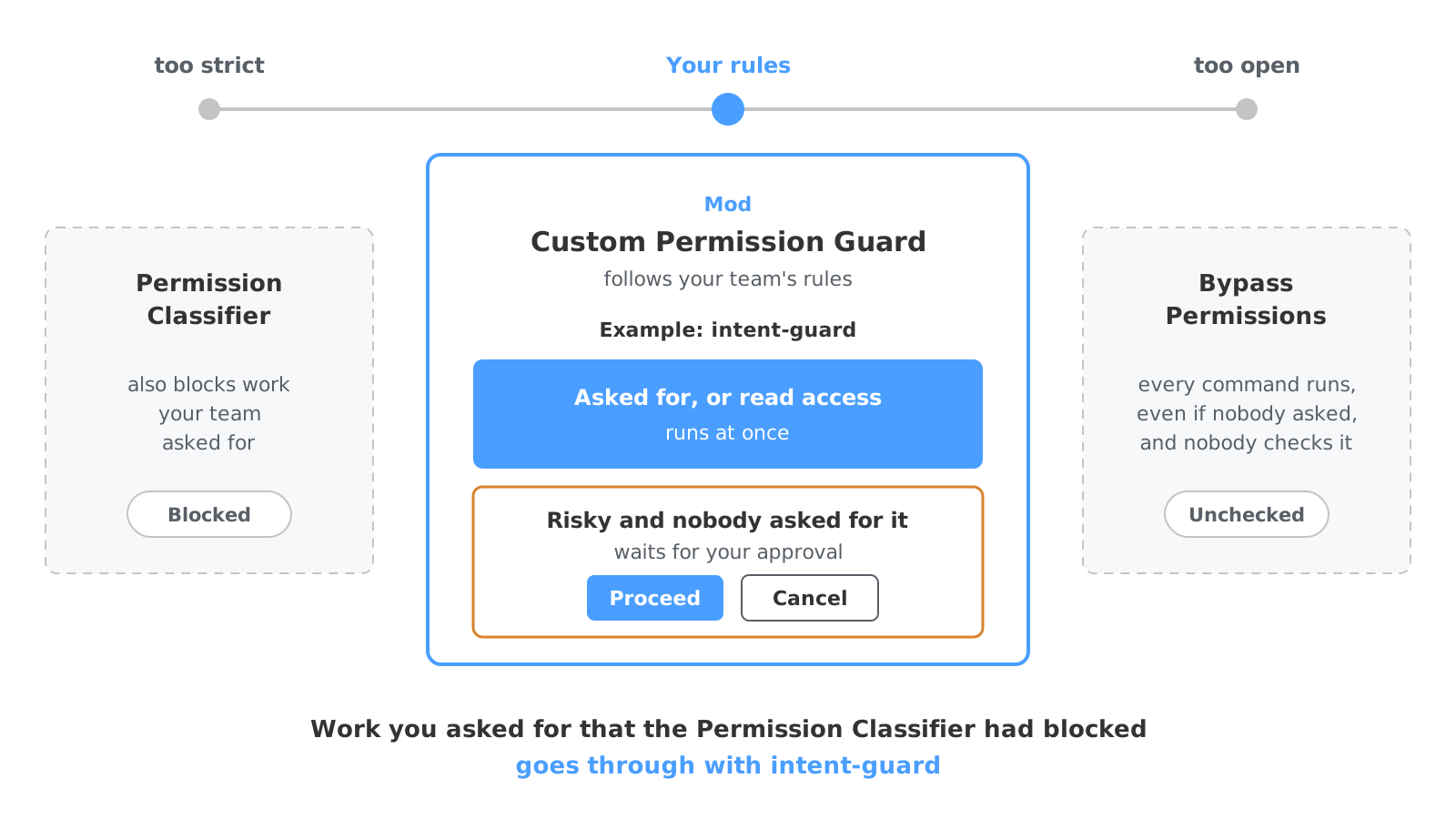
In its guide, Anthropic calls a mod like Blast Radius a safety net. Such a mod reads the text of a command, so a command that runs through an alias or a script gets past it. Hard blocks therefore belong in Claude Code’s permission rules, the fixed lists of allowed and blocked commands; intent-guard runs on top of them.
With ask-check, your developers stop losing time to needless questions
In long sessions, the agent buries developers in questions and findings that need no new decision. The team answered many of these questions long ago, sometimes an hour earlier, sometimes with an explicit “no more questions”. Each one holds up the work until someone gives the same answer again.
ask-check checks every question from the agent against the prompts so far. If the answer is already there, the mod shows the earlier sentence above the prompt, with the number of the prompt it came from. One key sends that answer back, and the agent carries on.
In the analysed history, the answer to one of the agent’s questions was, again and again, already in an earlier prompt.
With learn-queue, your harness learns from every session your team runs
Continuous learning means here that Claude Code reviews every session, and the next session starts with what was learned in it. At integrations.at a skill called claude-learn does this. It reviews the session, captures what was learned as notes, skills and rules, saves it in the project and in a personal collection of skills that applies across all projects, and closes the session. What claude-learn captures, the agent reads in the next session. This cycle of work, review and next session is called the learning loop.
As long as someone had to start claude-learn by hand, most sessions ended without this review.
learn-queue starts claude-learn by itself after five idle minutes, in every session that was more than a small fix with a single prompt. Above the prompt it shows when the run begins, and one key starts it at once. If other agents that Claude Code started for subtasks are still running in the session, learn-queue waits until they finish.
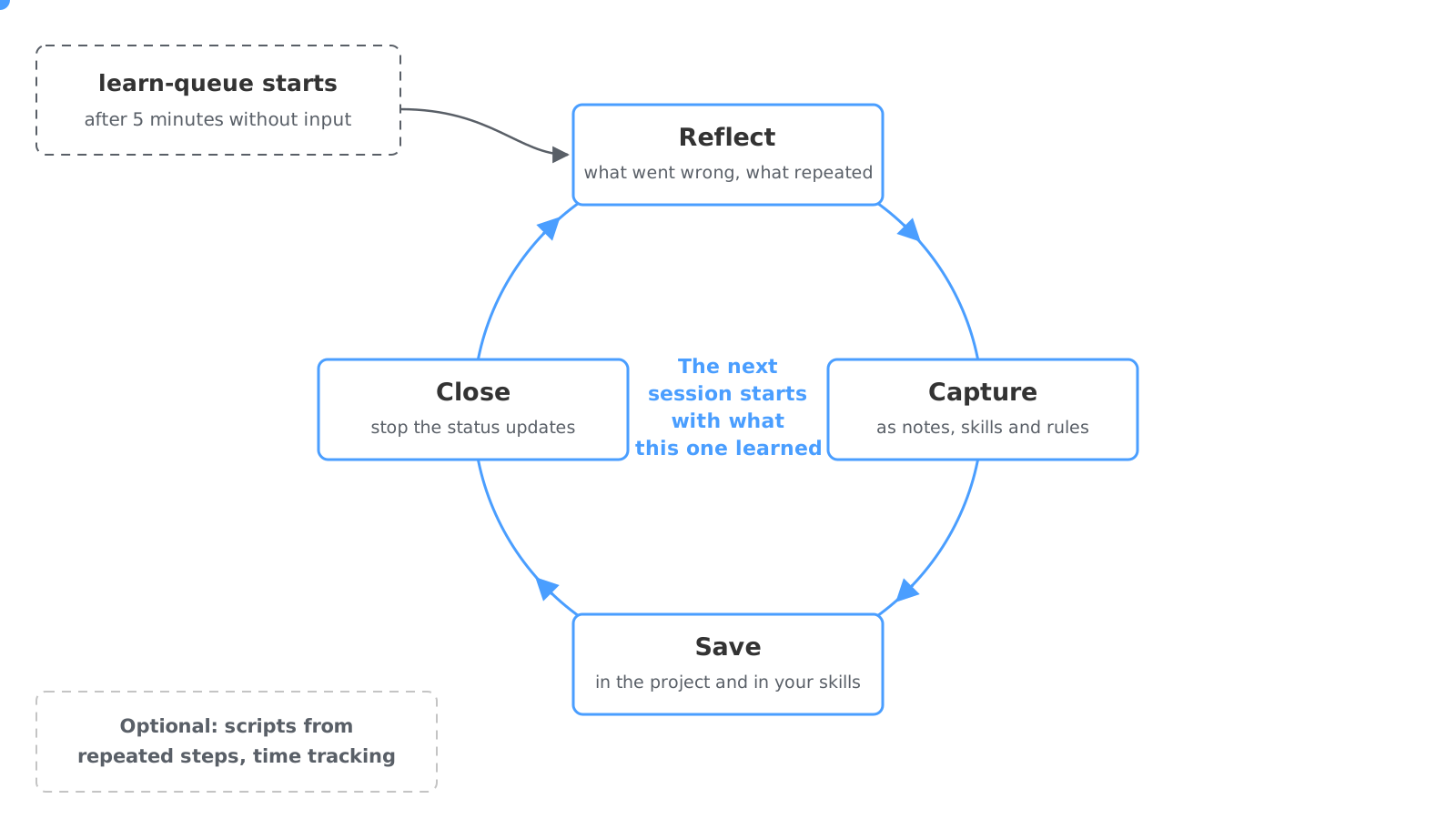
Two parts of the learning loop are optional and install as plugins of their own. One turns procedures the agent kept improvising into reusable scripts. The other records the working time of each session.
With report-loop, you see where the work stands throughout long agentic tasks
report-loop gives continuous feedback during long agentic tasks. When one of the agent’s tasks runs longer than five minutes, report-loop starts a status update every five minutes. A long job reports its progress without anyone having to ask. claude-learn ends these updates when it closes the session.
New team members work with the same mods and skills from day one
Mods are distributed through a marketplace like any plugin. According to the guide, it takes three commands: add the marketplace, install the mod, reload the plugins. A mod runs on the machine with the same access rights as Claude Code and comes from its publisher. Anthropic therefore advises treating a mod like a package (a third-party software library): read the repository first and install only from publishers you trust.
For a company, this means a mod belongs in the same review as any other code that runs in production. integrations.at checks third-party mods and plugins line by line before installing them, scripts included.
How to get your first mod that saves your team measurable time
- Have Claude Code analyse your team’s session history: which requests recur, which commands were cancelled or rejected, and how changes are reviewed.
- Take the pattern that costs the most time and describe in one sentence what a mod should show or stop for it.
- Replay the mod against the real history before anyone installs it. The numbers from that run decide whether it stays.
These mods are part of the harness integrations.at uses to deliver agentic software engineering on its customers’ codebases.


