
Deterministic Sub-Agent Orchestration using Claude Mods
A delegation rule written into the prompt is a recommendation: the model weighs it against everything else in the context and can override it. A mod enforces the same rule as code on every agent call. Every task goes to the subagent whose tools fit it and runs on the cheapest model that can solve it.
Part 1: The mod brings every task to the right specialist and model
Specialized subagents deliver better work at lower cost
Three things define a subagent: its prompt with instructions, skills and house rules, its tools, such as the Angular CLI’s MCP server and Chrome DevTools, and its model. A specialist with the right configuration works better and cheaper than a general-purpose agent.
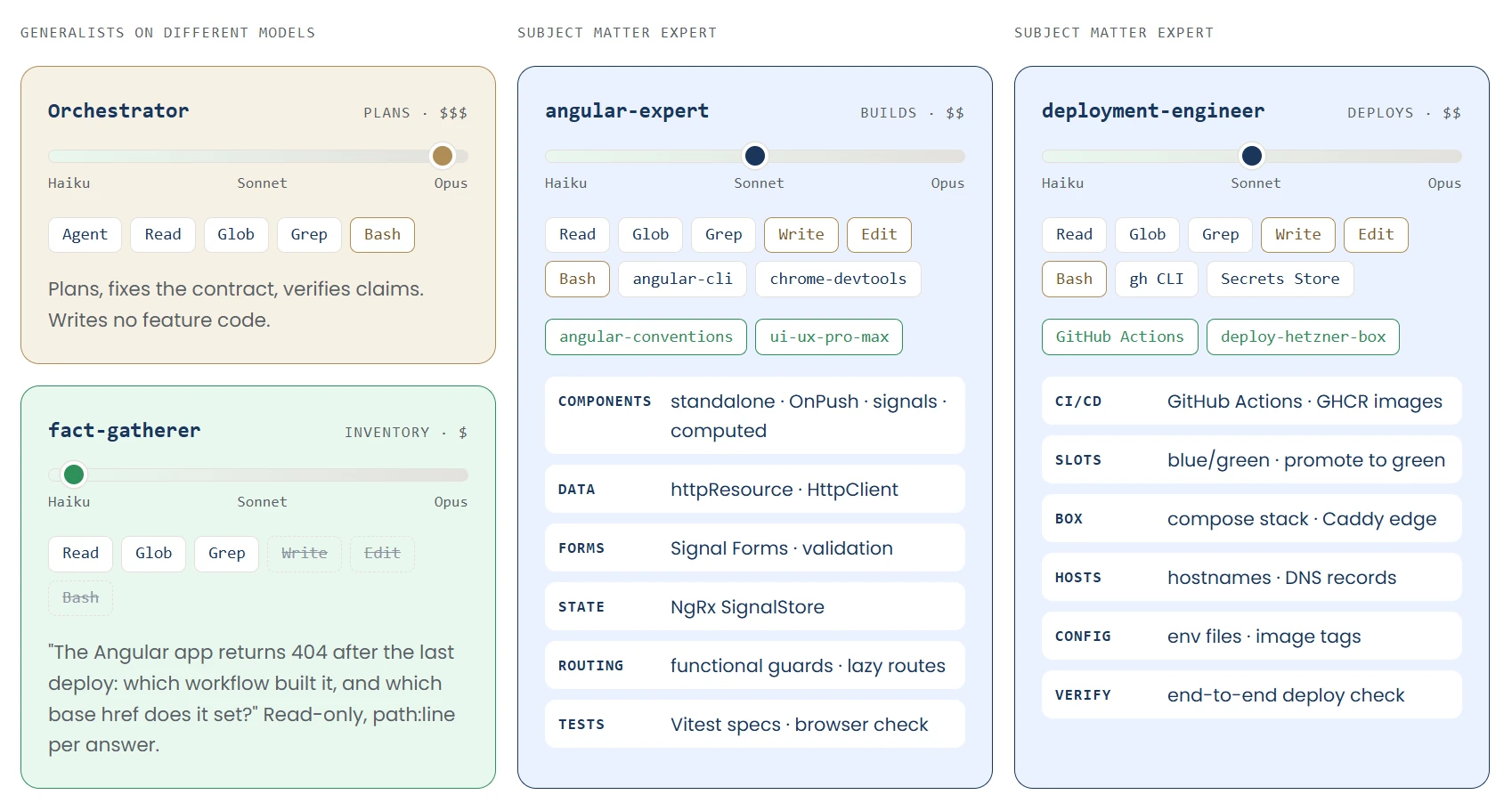
The orchestrator plans on Opus, the fact-gatherer builds an inventory of what already exists on Haiku, and angular-expert and deployment-engineer work on Sonnet with the tools and skills of their stack. The cheap, fast Haiku 5.5 is enough for an inventory. Sonnet handles implementation and tests within one stack, Opus handles planning and creative work.

A simple two-tier app shows how this works, from the request to the checked result: “Add field X to list Y”. An inventory on Haiku collects the facts the contract depends on, one specialist on Sonnet per tier implements that tier’s half, and Opus plans and checks. Every step runs on the cheapest model that can handle it. The contract sits in a shared ledger, and every agent reads the same facts from it. No detail gets lost as summaries pass from agent to agent, and a process that breaks off, for instance because it runs out of tokens or its cache expires, picks up again from the state in the ledger.
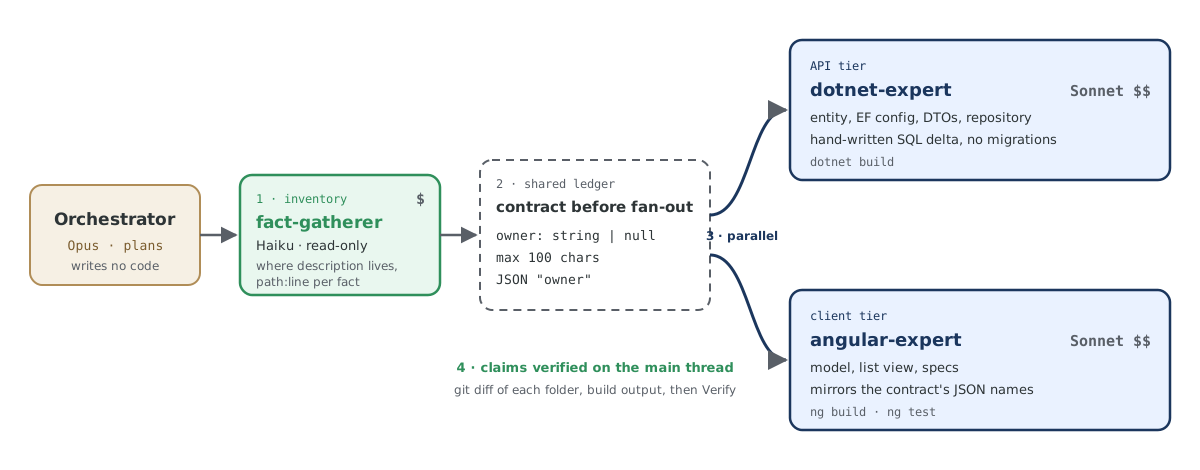
The flow has four steps. First the fact-gatherer on Haiku finds every place in the code where the field occurs and reports it with file and line. From that, the orchestrator fixes the contract in the ledger, in this example a field owner, text or empty, at most 100 characters. Then dotnet-expert in the API tier and angular-expert in the client tier implement it in parallel on Sonnet. Finally the main thread checks their claims against diff and build.
Choosing the agent means choosing its model, with its cost, and its expertise: the system prompt and tools, such as the Angular CLI for angular-expert or the gh CLI for deployment-engineer, decide how good the work turns out.
The model decides whether a delegation rule applies
The model decides, based on prompt text, whether Claude Code delegates a task and to whom. An agent description only raises the likelihood of a delegation. So Angular work that angular-expert would do on Sonnet ends up with a general-purpose agent. That agent inherits the orchestrator’s Opus model and lacks the right tools, such as the Angular CLI’s MCP server and Chrome DevTools. The result ignores the standards set in the specialist, is often wrong, and spends tokens inefficiently.
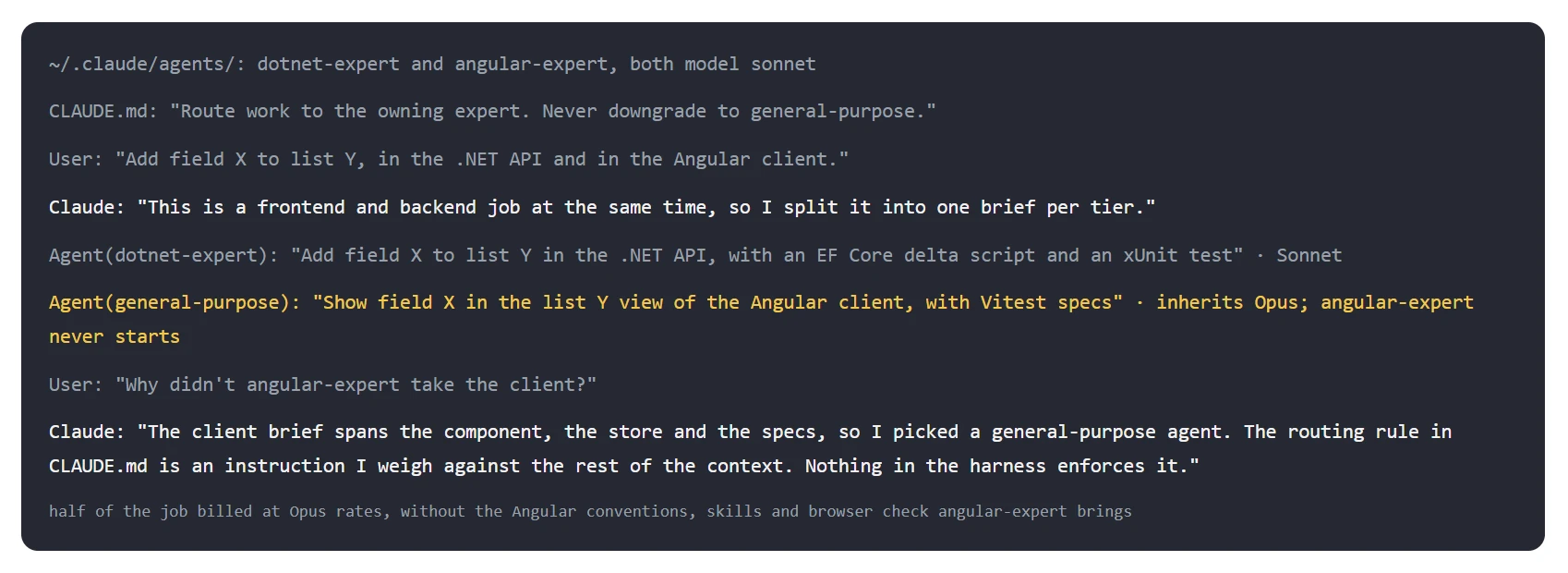
In the example, the CLAUDE.md requires work to go to the responsible specialist. Claude gives the API to dotnet-expert on Sonnet and the client prompt to a general-purpose agent that inherits Opus; angular-expert never starts. Asked about it, Claude explains the reason itself: the rule in the CLAUDE.md is an instruction it weighs against the rest of the context, and nothing in the harness enforces it.
Hooks keep the CLAUDE.md short and repeat its rules before every prompt
Before mods, the delegation rules sat in the CLAUDE.md like a constitution, and hooks enforced them. claude-md-guard.sh made sure the Claude Constitution did not get bloated. delegation-reminder.sh brought the skill check and the delegation rules back into the context before every prompt, to counter context decay: in a long session, early instructions lose weight the more new text enters the context.
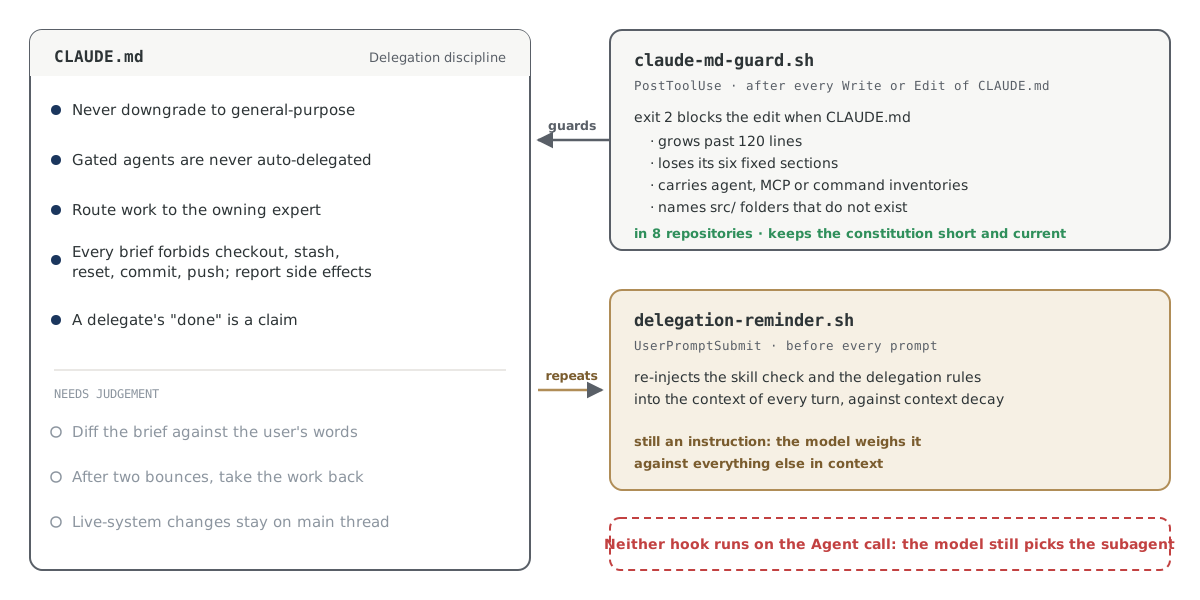
Five of the rules in the CLAUDE.md can be checked and therefore enforced; three need judgement.
A mod enforces the delegation rules as code on every agent call
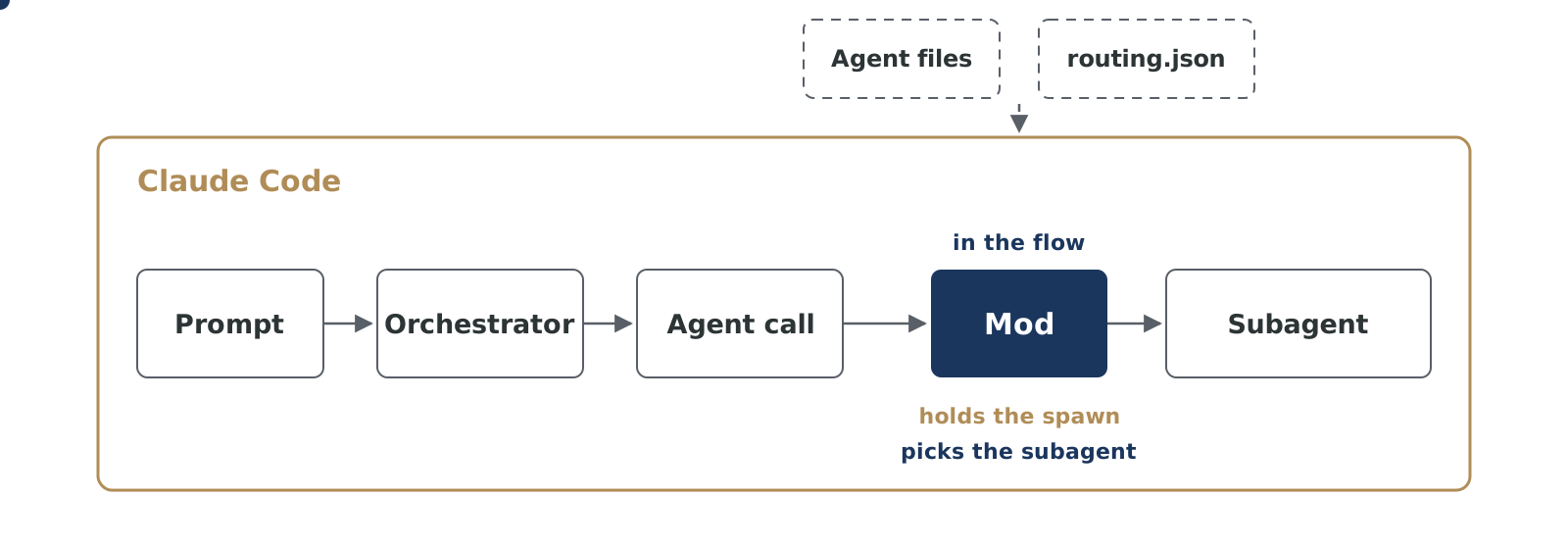
The mod intercepts every agent call before the subagent starts. It holds the spawn and determines the target agent from the agent definitions and routing.json. Every potential delegation error lands in the log, and our learning loop makes sure it does not happen again. That way every session runs with the same rules. What else mods do in the harness is covered in the article Optimizing Agentic Software Engineering With Mods .
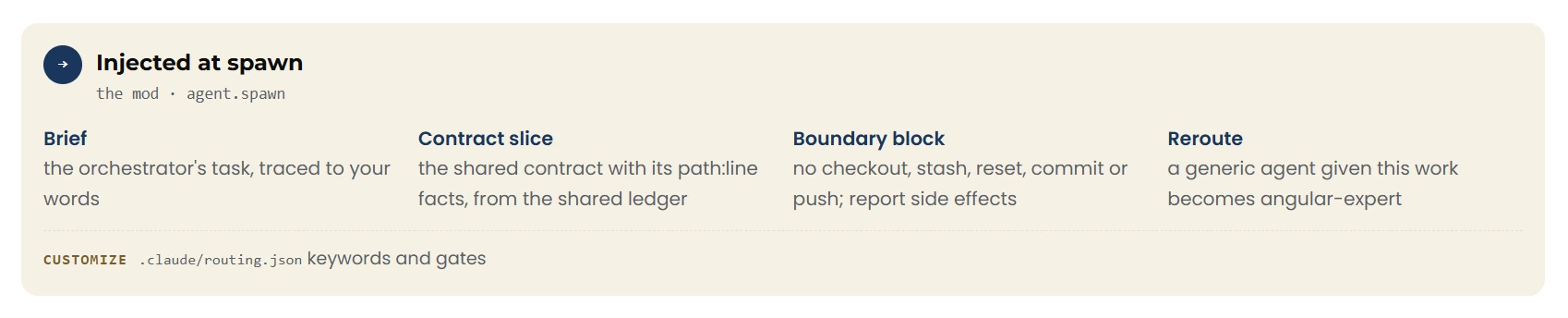
Before a subagent starts, the mod hands it four things: the prompt with your request, the part of the contract it is to implement, a boundary block with the actions it must not perform, and, where needed, the reroute to the responsible specialist. Every subagent starts under the same rules, however long the session has been running.
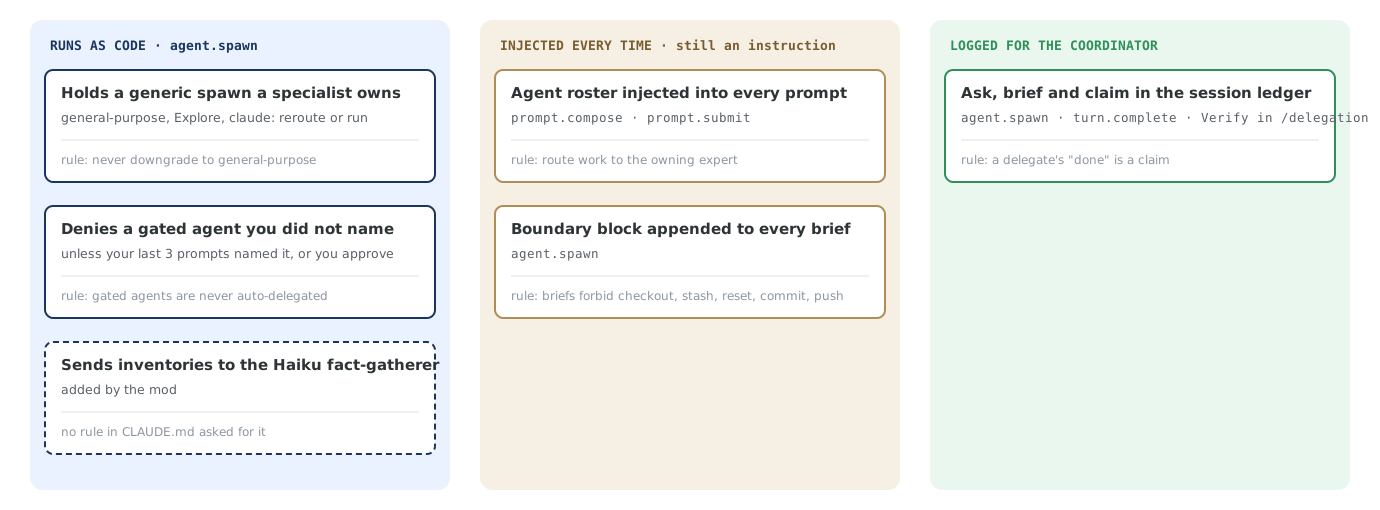
The mod enforces three rules as code: it holds a generic spawn when a specialist owns the work, it blocks gated agents you did not name, and it sends every inventory to the fact-gatherer on Haiku. It adds the agent roster to the system prompt and the boundary block to every prompt; both remain instructions to the model. It records each subagent’s request, prompt and claim in the ledger for the orchestrator.
The same prompt reaches the same specialist on every spawn
Back to the example with the new field: the prompt for the Angular client that had ended up with the general-purpose agent now passes through the mod. The mod holds it and reroutes it to angular-expert on Sonnet.
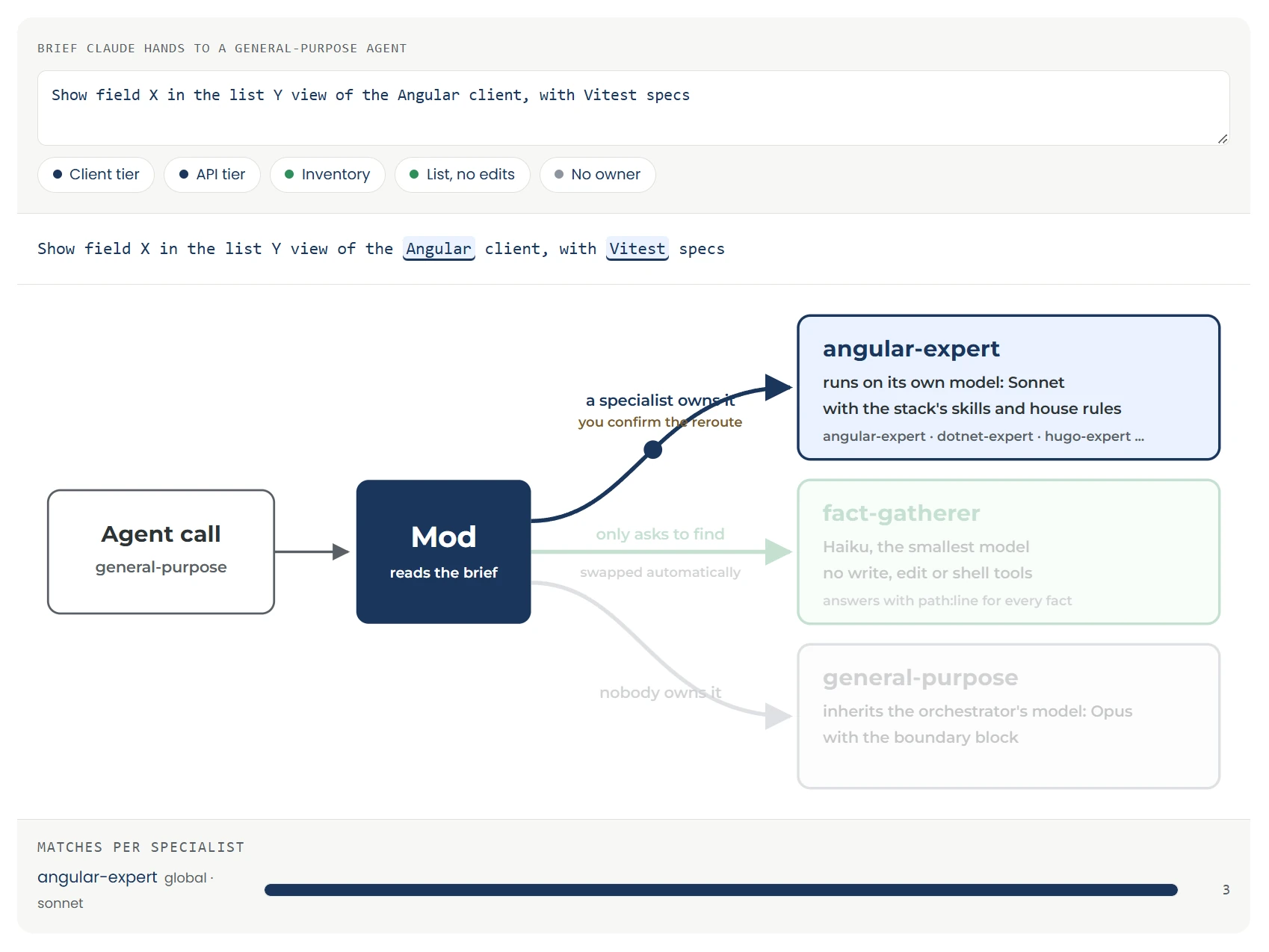
The mod reads the client prompt, recognizes Angular and Vitest in it and routes the agent call to angular-expert, which works on Sonnet with the skills of its stack. You confirm the reroute.
The table shows five prompts and the agent the mod routes each one to. A prompt that changes code goes to the specialist for its stack, an inventory to the fact-gatherer on Haiku. When no specialist owns a task, it stays with the general-purpose agent.
| Example | Prompt | Target agent |
|---|---|---|
| Client tier | “Show field X in the list Y view of the Angular client, with Vitest specs” | angular-expert |
| API tier | “Add field X to list Y in the .NET API, with an EF Core delta script and an xUnit test” | dotnet-expert |
| Inventory | “Find out where list Y is defined and used, in the API and the client” | fact-gatherer |
| List without changes | “List every file that touches list Y, do not edit anything” | fact-gatherer |
| No owner | “Rename field X in the helper script” | general-purpose |
Because the mod routes by the same rules on every agent call, the same prompt always reaches the same specialist on the same model. That lets us assume deterministic orchestration.
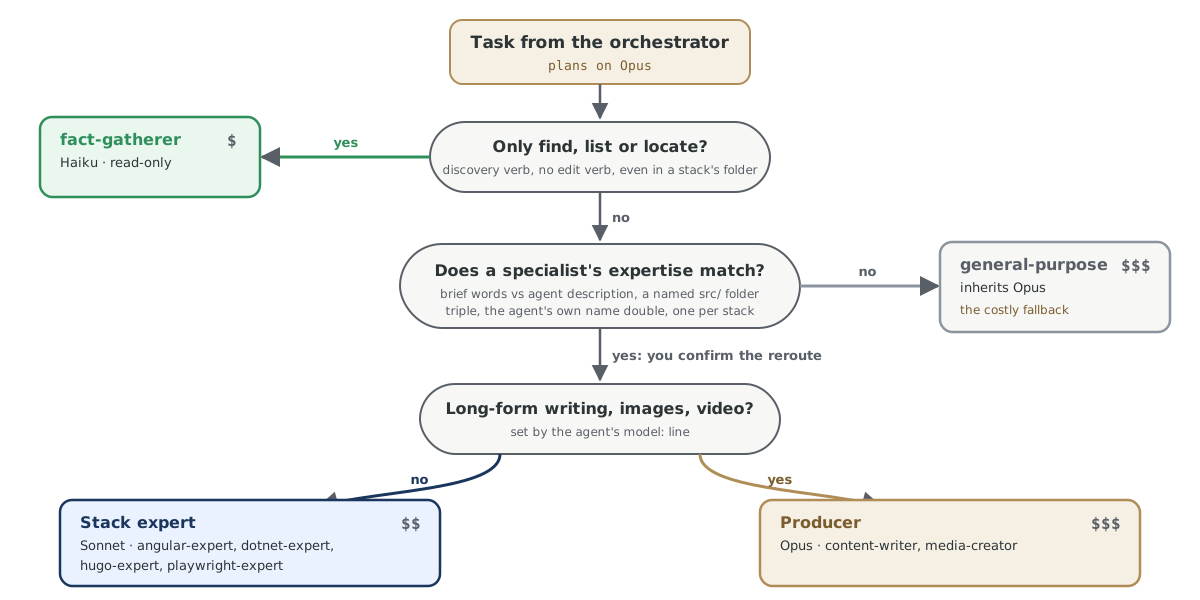
Every task from the orchestrator goes through the same questions. If it only needs to find or list something, it goes as an inventory to the fact-gatherer on Haiku. If a specialist’s expertise fits, the kind of work decides: code goes to a stack expert on Sonnet, long texts, images and video go to a producer on Opus. If nobody owns the task, the general-purpose agent on Opus takes over, the most expensive path.
Part 2: Optimizations cut costs and delegation errors further
The optimization of our harness architecture goes further than this. Three more steps cut costs and delegation errors:
- A graph ledger that cuts costs more, the more agents work on the same contract
- A learning loop that catches delegation errors during the session and fixes their cause afterwards
- A /delegation command and side pane , a UI extension that gives us extra information while the harness runs
The graph ledger saves more with every additional consumer of a contract
Every session keeps a shared agent ledger, the file agent-ledger.md in the session’s scratchpad. Only the main thread may write to it. Per agent it records the prompt; the claim, meaning the agent’s report that the work is done; the proof that someone checked that report; and the side effects, meaning everything the agent changed outside the edited files, such as servers started, packages installed or new rows in the database. Subagents started later get their prompt from this ledger. What one agent has already checked, or what turned out to be a dead end, no other agent has to work out again, and you pay the tokens for it only once.
The simplest ledger is a Markdown file, a log-like list in which each entry sits below the previous one. It knows nothing of relationships between the entries. Which fact belongs to which contract, and which specialist needs which part of it, the orchestrator works out itself and repeats by hand in every prompt. A graph stores these relationships along with the entries: facts, contract and agents are linked, and each agent gets exactly the part it needs. GraphRAG and agent memory work the same way.
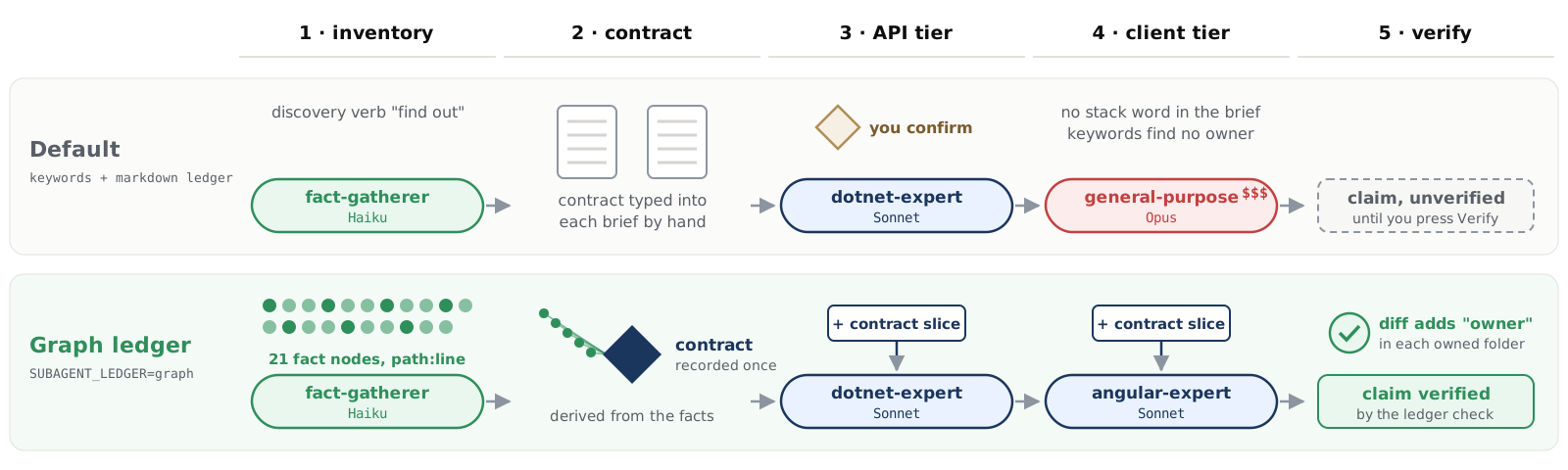
With a Markdown ledger, the orchestrator types the contract into every prompt by hand, and a client prompt without a stack word ends up as a general-purpose agent on Opus. With the graph ledger, the inventory yields 21 facts, the contract is derived from them once, and dotnet-expert and angular-expert get their part of it at spawn. A claim counts as checked only when the ledger check confirms the diff.
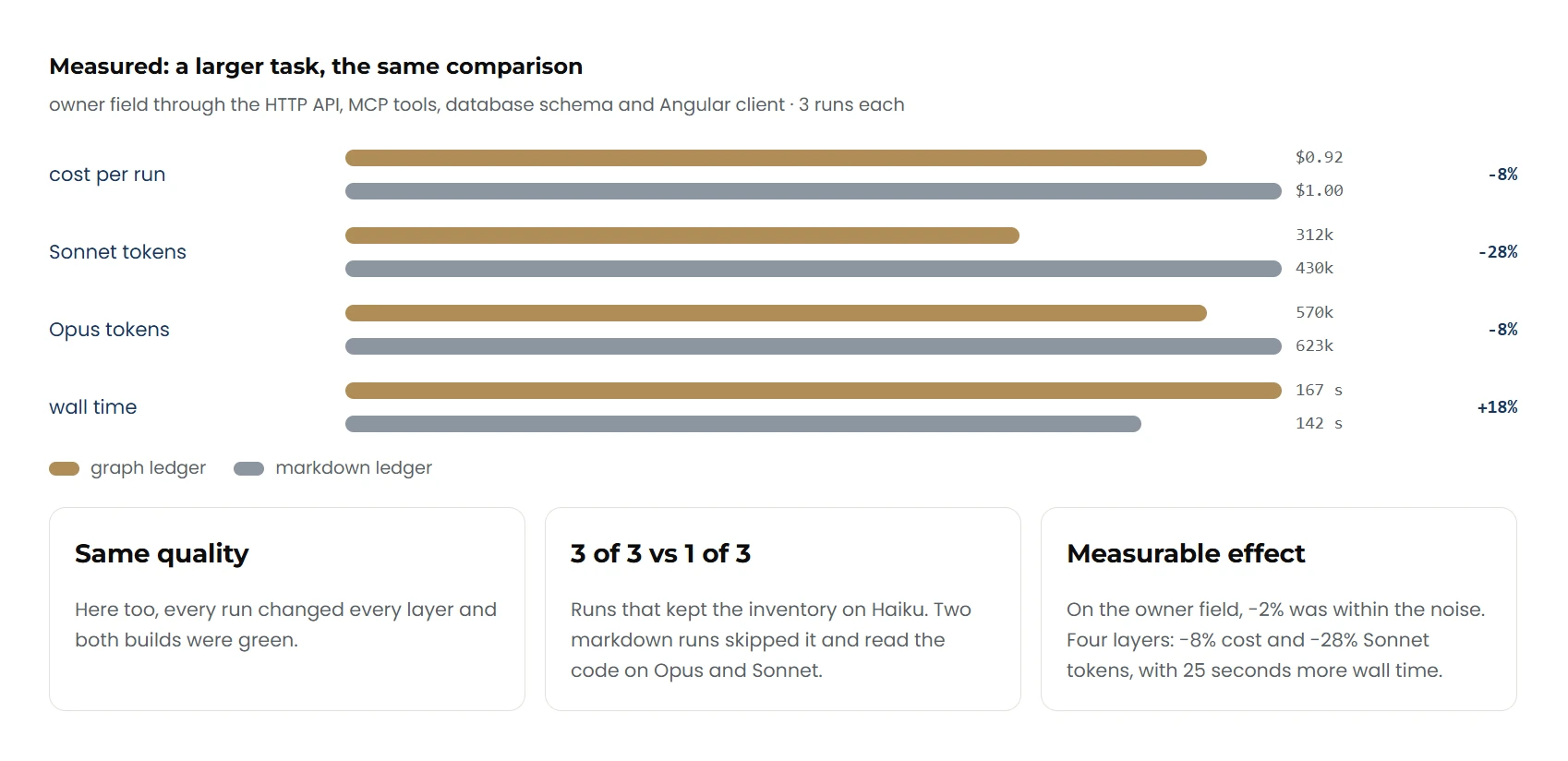
Our question was whether a graph ledger could raise efficiency even further. We expected no gain for a contract with two consumers. The measurements confirmed that and also showed that the savings grow with every additional consumer. All figures in this section come from measured runs.
We measured three tasks with three runs per variant (Markdown ledger and graph ledger). Each run was its own Claude Code session without intervention, with the orchestrator on Opus and in a fresh copy of the repository. The cost per run is the cost Claude Code reports for the session; we added up the tokens per model from the transcripts of all agents. Equal quality means every layer contains the change and every build is green. Runtime tests were not part of the measurement, and one client whose build already failed before the runs was left out of the assessment.
We also tested Jev as a decision layer that picks the agent for a prompt before the LLM does. In our runs Jev brought no performance benefit, so we did not include those measurements in this article.
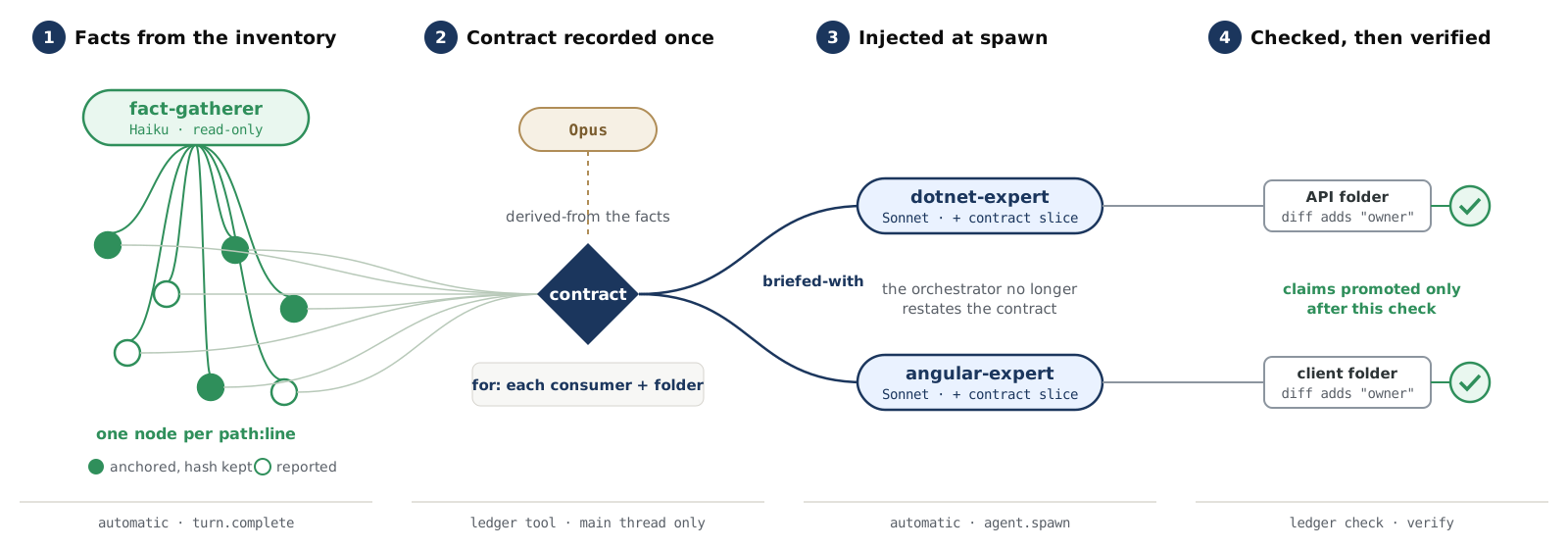
The graph ledger works in four steps. First the fact-gatherer on Haiku reports what it found in the code, and each finding becomes a fact of its own in the graph. From these, the orchestrator on Opus derives the contract once and decides which agent implements which part of it. At spawn, dotnet-expert and angular-expert on Sonnet get only their part, the contract slice, and the orchestrator no longer has to write the contract into every prompt. Finally the ledger check looks at each folder’s diff to see whether the new field was really added. Only then does an agent’s claim count as checked.
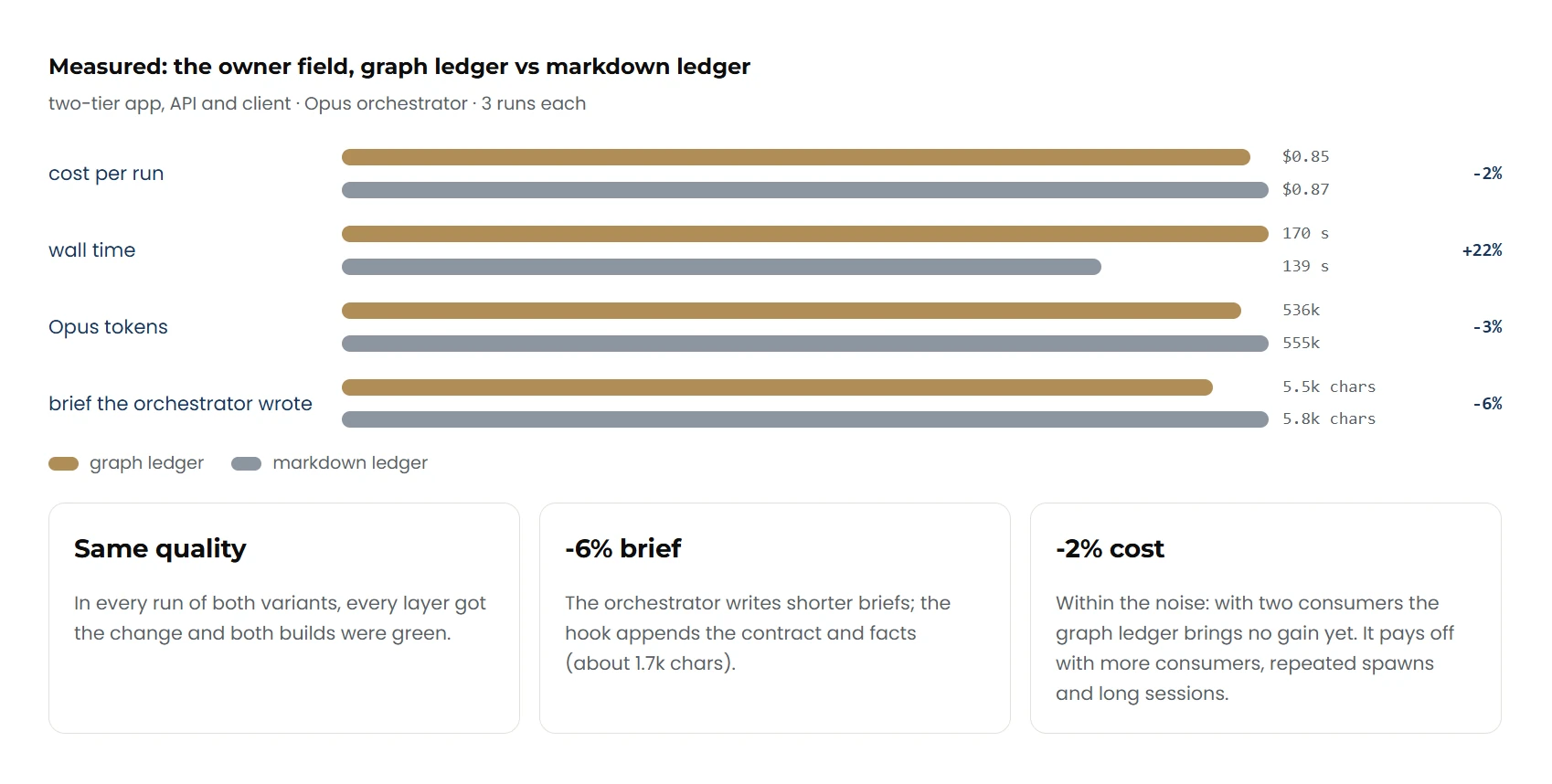
With two consumers, the 2% cost difference is within the noise, a run with the graph ledger takes 22% longer, and quality is the same in both variants. The fact-gatherer found 21 facts per run on average, meaning places in the code that the contract builds on.
The cost advantage grows with the number of consumers. With two agents on the same contract, both ledgers are almost level; with four, a run costs 1.49 dollars with the graph ledger and 1.65 dollars with the Markdown ledger.
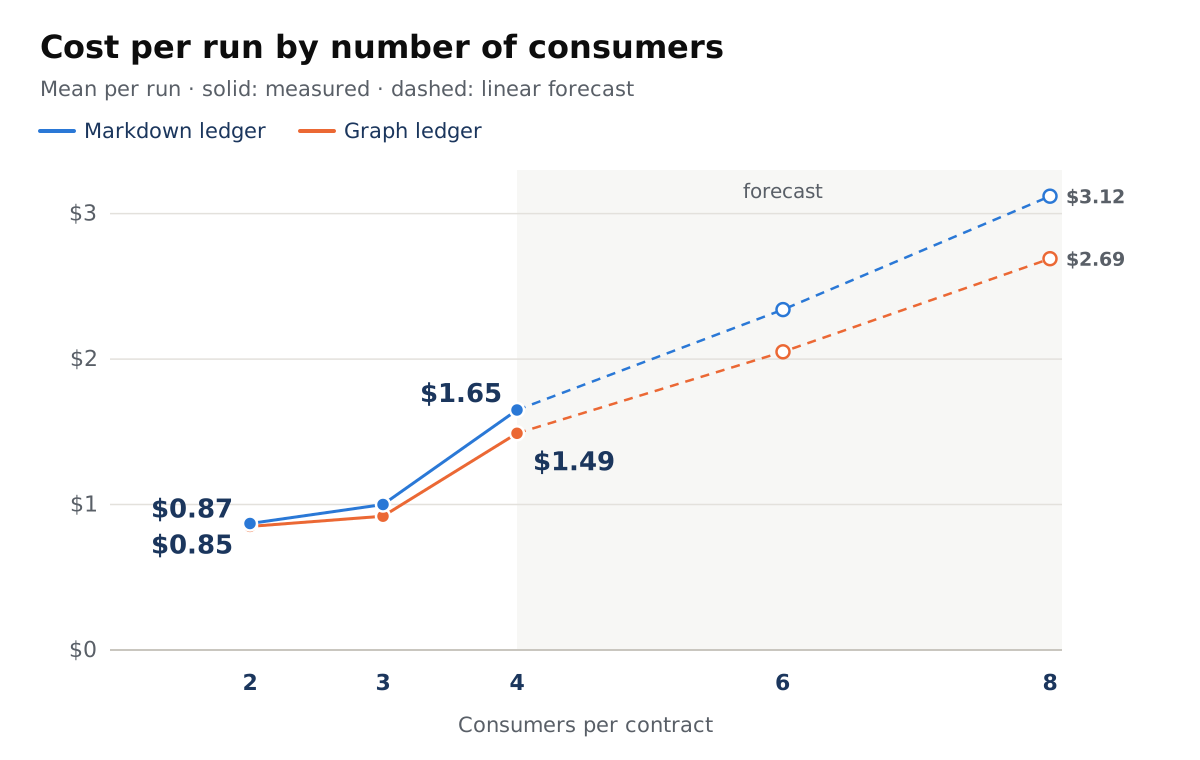
| Consumers | Markdown ledger | Graph ledger |
|---|---|---|
| 2 | $0.87 | $0.85 |
| 3 | $1.00 | $0.92 |
| 4 | $1.65 | $1.49 |
| 6 (projection) | $2.34 | $2.05 |
| 8 (projection) | $3.12 | $2.69 |
The graph ledger saves 2% with two consumers, 8% with three and 10% with four. The linear projection reaches 13% with six and 14% with eight. Three tasks are few data points, which is why the dashed part is a projection. In every run of all three tasks, each layer received the change and both builds were green. For the task with four consumers, the costs of the individual runs overlap, so the 10% there is a trend.
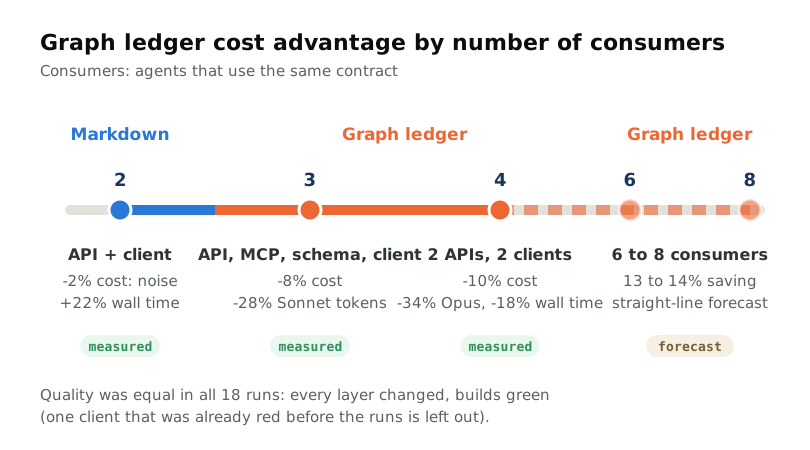
With two consumers, the Markdown ledger is therefore enough; from three consumers on, the graph ledger pays off.
Delegation learning loop
A harness that learns from its own mistakes is state of the art today. During the session, the mod catches a delegation error at spawn and holds it for you. After the session, the error goes from the log to claude-learn. The skill corrects the agent’s trigger, routing.json or the mod itself, and the next session routes the same prompt correctly.
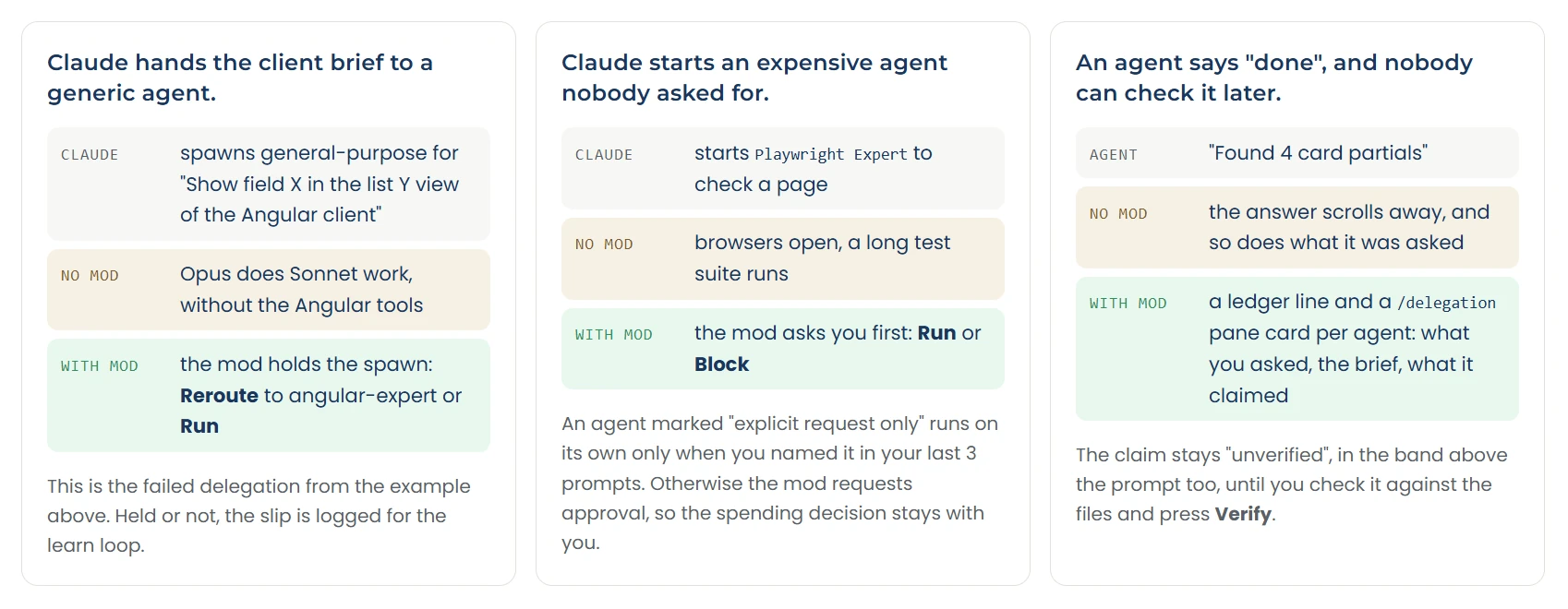
The mod catches three typical errors during the session. If Claude gives the client prompt to a generic agent, the mod holds the spawn and offers the reroute to angular-expert. If Claude starts an expensive agent like the Playwright expert that nobody asked for, the mod asks first. When an agent reports “done”, the claim lands in the ledger and stays open until you check it.
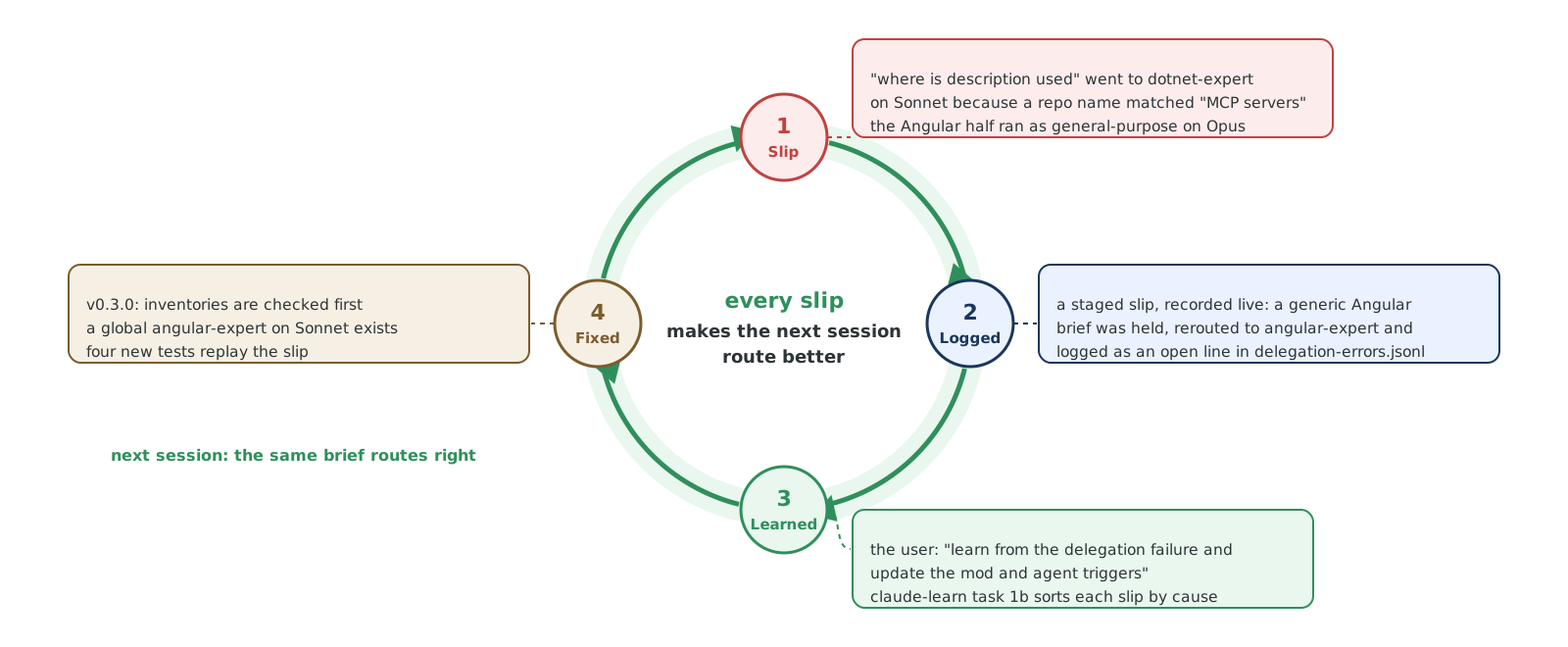
After the session, claude-learn fixes the cause. In the example, an inventory ended up with dotnet-expert because a project name matched the keyword MCP Servers, and the Angular half ran as a general-purpose agent on Opus. Since the fix, the mod checks inventories first, there is a dedicated angular-expert on Sonnet, and four tests replay the error so that it stays fixed.
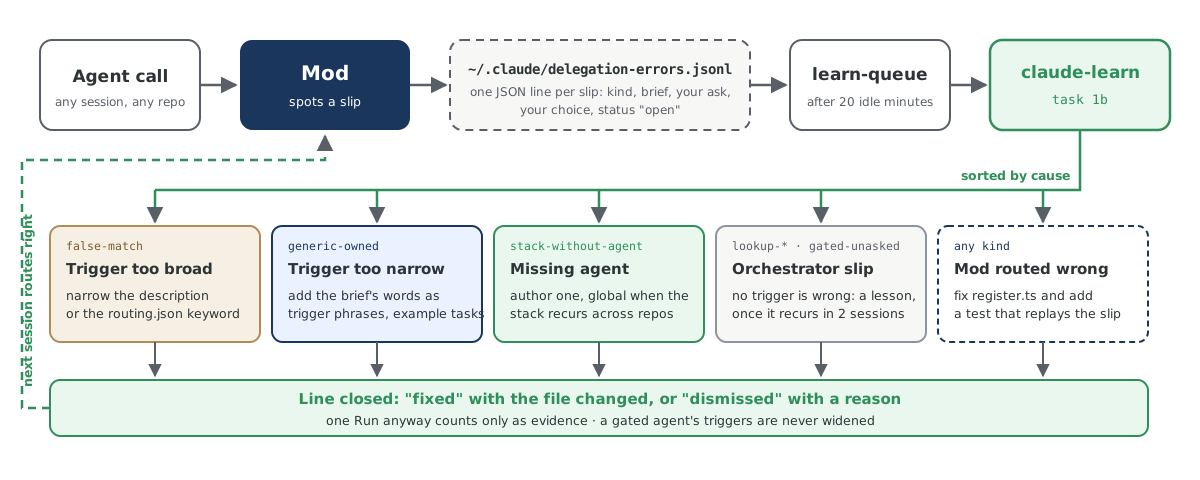
Every detected error lands in the log as an open row. As soon as nobody has typed anything for 20 minutes, learn-queue starts the claude-learn skill. It sorts the errors by cause: a trigger that is too broad gets narrowed, one that is too narrow gets additional trigger phrases, a missing agent gets created, and an error in the mod gets fixed with a test. The next session already works with the corrected files.
The /delegation pane shows each subagent’s model, cost and open claims
Working with the orchestrator, you see the main thread. The subagents work in the background: which agent took which prompt, on which model, at what cost, and whether its “done” was checked is buried in the transcript. The mod records every spawn, every prompt, every claim and every model request anyway. The /delegation pane puts that record next to the conversation. In the terminal it is a plain text list. In the Code tab of the desktop app, the pane draws a header with the tiles Cost, Tokens, Time and Unverified, one card per agent, grouped by Running, Claimed and Verified, and a Decisions card with the reroutes.
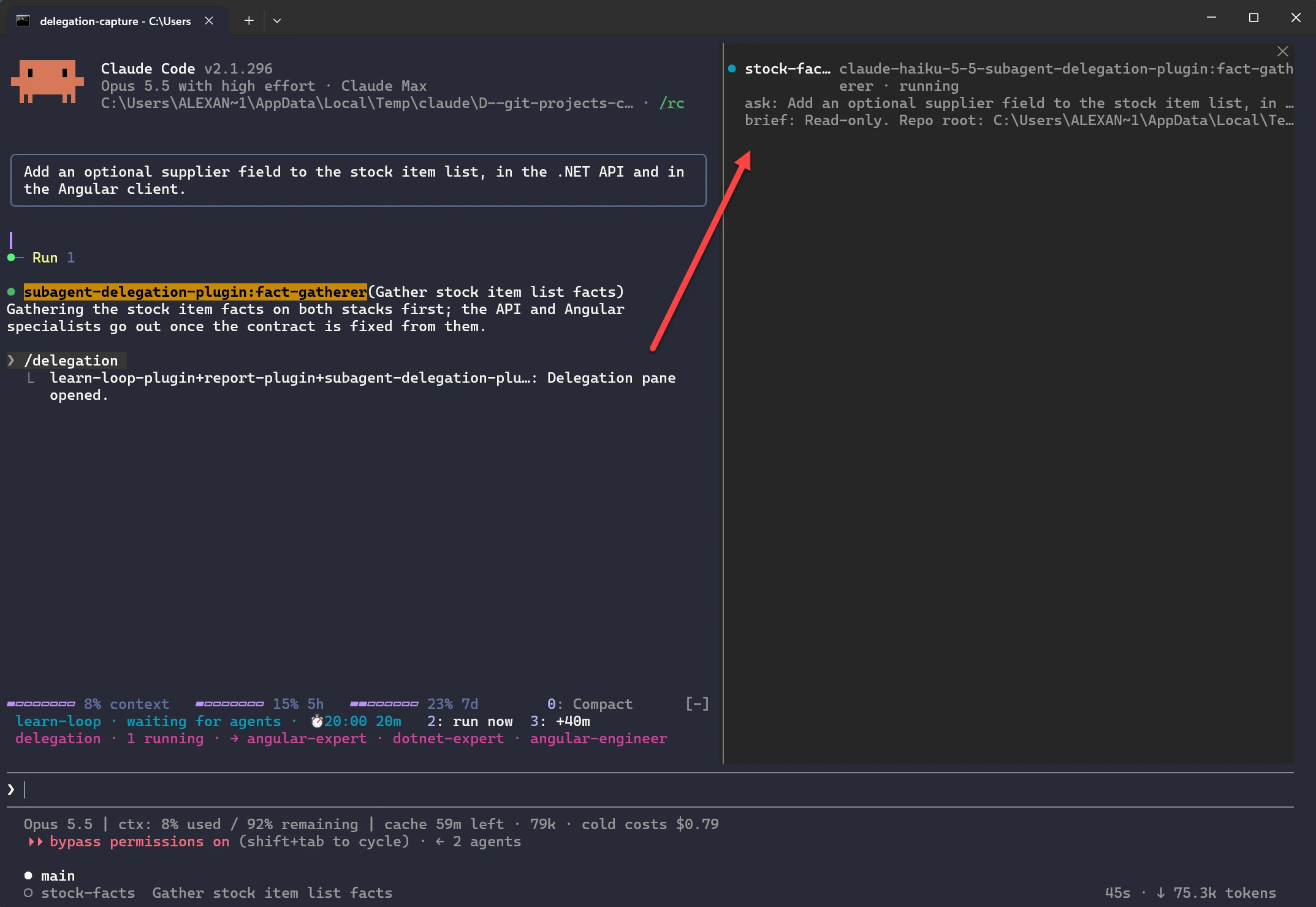
Before any code changes, the fact-gatherer reads where stock items occur in the API and the Angular client. It works read-only and on the cheapest model; the experts start only once the contract built from its facts is settled. The band above the prompt shows one running agent and the specialists the mod found for the prompt. The arrow leads from the command to the pane: one line per agent with model, status, your request and the prompt it received.
In the Claude desktop app, the mod draws the same pane with its own UI. The desktop app can show elements the terminal cannot display, such as SVG graphics, so panes there can be far richer than in the terminal.
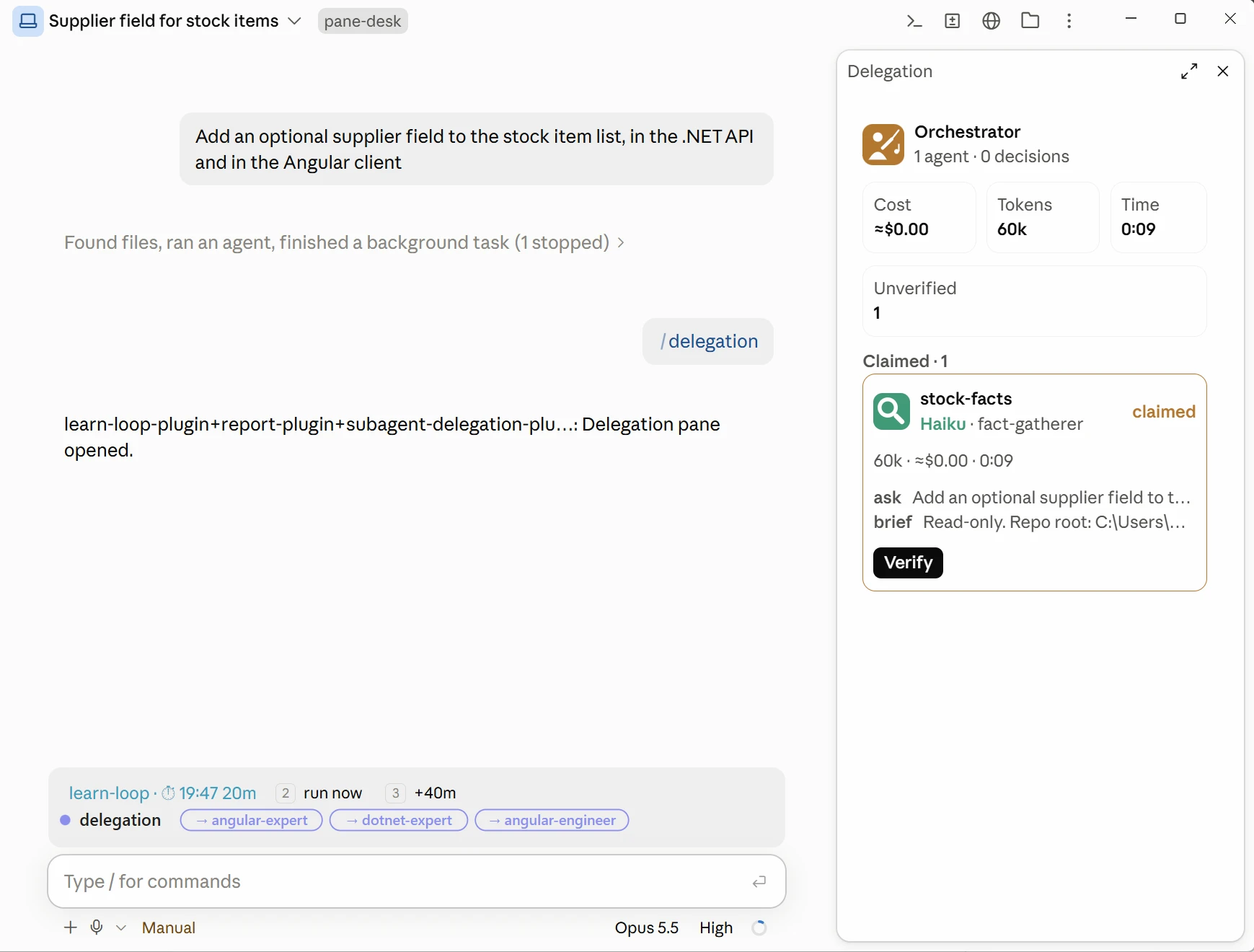
The header tiles add up cost, tokens and time of all subagents so far; Unverified counts the claims nobody has checked yet. The costs are an estimate: the mod prices the tokens of each model request at the rate of the model that handled it. The magnifying glass marks the fact-gatherer, and the model is color-coded: Haiku green, Sonnet blue, Opus amber. Each card shows its own tokens, cost and time, then your request, the prompt and, as soon as the agent answers, the first line of its answer. A finished agent stays under Claimed until you check its claim against the files and press Verify; then it moves to Verified.
How this article was made: Alexander Kastil selected and supervised the benchmarks, the text was written with AI assistance, and Alexander Kastil then reset the focus and corrected errors.
Further links on mods, subagents and orchestration
- Mods overview : what a mod is, what it can change and where it runs; it draws panes in the terminal and in the Code tab of the desktop app.
- Create custom subagents : agent files with model, tools and description, which set the price tier and expertise of each specialist.
- How we built our multi-agent research system : Anthropic on a lead agent that coordinates parallel subagents, with prompts, tool selection and evaluation.
- Building effective agents : Anthropic on orchestrator-workers and other composable patterns, and when a workflow fits better than an autonomous agent.
- Hooks reference : settings hooks such as PostToolUse and UserPromptSubmit, which the delegation rules relied on before mods.
- React to events : guarding or rewriting a tool call and following a turn, the mechanism behind holding and rerouting an agent call.
- Draw in the interface : panes, the band above the prompt, buttons and state, as the /delegation pane and its Verify button use them.
- Plugins overview : plugins, marketplaces and install scopes, through which a marketplace distributes the mod and its fixes to every repository.


