
MCP Tasks for Long-Running Tool Calls
An employee asks the agent to import and check the new resource list. The list has several thousand entries. The agent calls the import tool. Then the chat stands still, minute after minute.
After a few minutes the chat reports an error. At that moment nobody knows how far the import got. For tasks of this length, the Model Context Protocol (MCP), the open standard agents use to work with the tools of other applications, has an extension of its own: MCP Tasks.
Long-running tool calls in a conversation with the agent
The import tool from the scene is a function that an application offers the agent. An MCP server provides it. The agent itself runs in a client, the application your team uses to work with it, for example Claude Code or an agent in Microsoft Foundry. When the agent calls a tool, that step is called a tool call. The agent waits for the tool’s response before it carries on.
Tool calls are designed for a response within seconds. The MCP project’s documentation notes that many clients and network proxies set timeouts that make waiting longer than a few seconds impractical. Microsoft Learn states that Microsoft Foundry ends an MCP tool call with a synchronous response after 100 seconds. The employee’s import broke off at a timeout like this.
The common workaround splits a long task across two tools: one to start it and one for polling, where the agent asks for the status again and again. With polling, the model needs a turn of its own for every check. Every turn costs tokens, the units in which models are billed.
MCP Tasks grew out of a SEP, a Specification Enhancement Proposal for the Model Context Protocol. The SEP calls this polling by the agent needlessly expensive and unreliable, because whether the agent asks at all depends on the prompt. One team reports in it that its model invented job names when it had not first queried the running tasks. Long-running tool calls therefore need a process of their own in the Model Context Protocol.
MCP Tasks as a claim ticket
MCP Tasks is an official extension of the Model Context Protocol, maintained by the MCP project itself. With MCP Tasks, the server accepts a long task and hands the agent a task ID, like the claim ticket you get at a repair shop. The work carries on in the background. The agent’s client takes over the polling and collects the result as soon as it is ready.
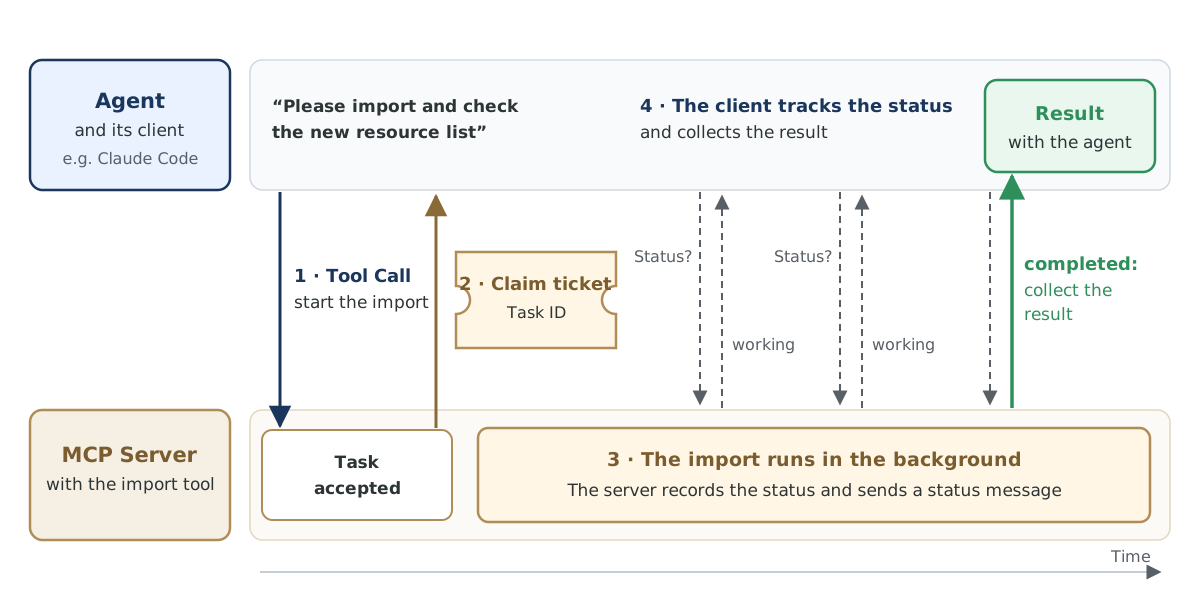
The process has four steps. First, the agent calls the import tool. Then the server accepts the task and returns the task ID. It carries on with the import in the background, records the status as it goes and sums it up in a short status message. At the poll interval the server sets, the client asks for this status and collects the result as soon as the task is completed.
The task ID is durable: the server stores the task before it returns the task ID. If the connection drops or the client restarts, the client resumes polling with the same task ID, according to the MCP project’s documentation. That way the import survives a network failure.
The benefit of MCP Tasks in everyday work
With MCP Tasks, the employee’s import runs in the background. Meanwhile she talks the next job through with the agent. The agent stays responsive for as long as the import runs. She spends the waiting time on her own work.
The import can take as long as it needs. Claude Code’s documentation sets no time limit on a background task. If an MCP tool call is still running after two minutes, Claude Code moves it to the background. In Microsoft Foundry, an agent in background mode works out its response asynchronously. The MCP tool call then runs past the 100-second timeout with no open connection.
The client handles the polling, at the poll interval the server sets. It asks with exactly the task ID the server issued. According to the SEP, this polling runs in the background without blocking the agent.
Along the way, a short status message shows the employee how far the import has got. When a task needs a decision, for instance about duplicate entries, it can switch to the input_required status and use an input request to ask which entry applies. In interactive sessions, Claude Code shows such an input request in the terminal as a dialog where she makes the call. If she wants to end the import, the client sends the server a cancel request. The server stops the work as soon as it can be halted.
Once the import is finished, the client collects the result. The agent presents the checked list to the employee. Clients that do not support MCP Tasks get the familiar synchronous response from the same import tool. That lets you move your tools over one at a time and keep every client your team uses today.
Many departments have tools that run for a similar length of time. Three use cases from controlling, finance and marketing show where such tasks come up in your company.
Data analysis across large tables in controlling
For a controlling question, such as the costs per cost center over several years, the data agent in Microsoft Fabric, Microsoft’s data platform, searches large tables or runs several queries. As an MCP server, it answers such questions as a task, because according to Microsoft Learn they can take longer than a client keeps the connection open. An agent in Microsoft Foundry reaches the data agent through the Fabric IQ tool and works in background mode until the response has the status completed. The controller asks her question in the chat and keeps working until the analysis is ready.
Report export for the month-end close in finance
For the month-end close, the finance team starts a report export from the accounting system through the agent. The Claude Code documentation names the report export as an example of an MCP task. With /tasks, the accountant sees the running tasks in Claude Code and cancels one of them when needed. If a remote MCP server provides the export, meaning a server on the company network or in the cloud, the export keeps running when she closes Claude Code in the evening.
Image series for a marketing campaign
For a campaign, the marketing team needs a series of images of one motif, in several formats. A tool for image series sends every prompt of the series as one single batch job to a model that generates images. As an MCP task, this job runs in the background, usually for minutes and for 24 hours at most. Meanwhile the head of marketing plans the campaign copy with the agent. As soon as the task is completed, the agent presents the images to her.
MCP Tasks in our MCP servers
In our MCP server for images and videos, generating an image series and rendering a video run as MCP tasks. Importing a long resource list runs as an MCP task in a project for a customer. All three fit the cases the MCP project recommends tasks for: tasks that take minutes or hours, and batch processing of many entries where the intermediate state matters. The MCP server keeps the status of its tasks in a database and answers polling across a restart. For the import, the task reads its status from the entries the application creates for each run. Whether a team can use such tasks depends on the client it works with.
MCP Tasks in clients and SDKs
MCP Tasks works as soon as both sides support the extension: the client your team uses to work with agents, and the MCP server with the long-running tool. Teams that build their own MCP servers need an SDK that supports MCP Tasks. The table sorts clients, platforms and SDKs by their status.
| Status | Clients and platforms | SDKs for your own MCP servers |
|---|---|---|
| Usable today | Claude Code on the command line, in the Agent SDK and in GitHub Actions (Public Beta); agents in Microsoft Foundry in background mode (Preview); the data agent in Microsoft Fabric, which as an MCP server answers questions across large tables as a task; the command-line client mcpc from Apify | the official C# SDK with its own Tasks package; FastMCP for Python through a separate package; the community PHP SDK mcp-sdk-php with a guide for the extension |
| In progress | OpenAI Codex, Google ADK, Microsoft Agent Framework and Mastra, each as an open issue | the official SDKs for Python and TypeScript as open issues, the TypeScript SDK with code for tasks in its npm package; the official PHP SDK as an open pull request |
| No information found | GitHub Copilot in VS Code, Cursor |
According to the Claude Code documentation, MCP Tasks is unavailable in the VS Code extension, in the desktop app, in a one-off run with claude -p and in sessions through Amazon Bedrock. For Claude Code, the MCP server has to speak the current protocol revision of the Model Context Protocol. Agents in Microsoft Foundry need a model that supports background mode. The client your team runs decides the first step.
The first step with MCP Tasks
Three steps fit into this week:
- List the tools of your MCP servers, each with the time it typically takes. For agents in Microsoft Foundry, every tool that runs longer than 100 seconds counts.
- Find out which client your team uses for its agents, and check it against the table.
- Start with the tool whose application stores every run. The task then reads its status from those entries and needs no database of its own.
integrations.at supports this step with the Complete Integration service and with module 4 of the class Agentic Software Engineering with Claude Code for teams that build their own MCP servers.
The making of this article
Alexander Kastil commissioned this article and the switch of the image series, the video and the import to MCP Tasks, and approved the switch. Agents in Claude Code carried it out and tested it. Agents gathered the information on clients and SDKs from the projects’ documentation and open issues and checked it against the sources. For the update, agents proposed three use cases that Alexander Kastil approved, and checked the status of the clients and SDKs against the sources once more. The text was written with AI assistance.
Sources
- Tasks
- SEP-2663: Tasks Extension
- SEP-1686: Tasks
- MCP Tasks Extension
- Connect Claude Code to tools via MCP
- Connect agents to MCP server endpoints
- Data agent as Model Context Protocol server
- Support the io.modelcontextprotocol/tasks extension
- Tasks
- Background Tasks
- Tasks Extension Guide (SEP-2663)
- @modelcontextprotocol/sdk
- Support MCP Tasks (task-augmented tool calls)
- Support the MCP Tasks extension in McpToolset
- Python: Design MCP 2026 Tasks client support
- Support MCP Tasks in @mastra/mcp
- Implement SEP-2663: Tasks Extension
- Implement SEP-2663: Tasks Extension
- Add the Tasks extension (SEP-2663)