
Agent-Ready Websites: Who Benefits from WebMCP

When agents browse, your site speaks back
AI agents are already sending paying visitors to commercial websites. In US retail, AI-referred traffic grew 393% year over year in Q1 2026, converting 42% better than non-AI sources at 37% higher revenue per visit. WebMCP lets a web page meet that traffic with structured, named tools instead of forcing an agent to guess from raw HTML.Published on 19 August 2026 as a W3C Draft Community Group Report, WebMCP is the work of editors from Microsoft and Google. A page registers tools that an agent running in the browser can discover and call: a name, a description, an input schema, and an execute function. The browser handles protocol and transport. This is a structured manifest of capabilities that agents can discover and invoke without reading the page’s visual layout. Chrome runs an open origin trial across versions 149 through 156; Edge runs its own origin trial from version 150.
The commercial momentum behind the spec is already visible. Shopify and Cloudflare have shipped. Expedia, Booking.com, Etsy, Instacart and Target are enrolled in the origin trial, which is a different and earlier thing. Search Engine Land put the direction plainly: tool descriptions are the new meta descriptions. Gartner predicts that by 2028, 90% of B2B purchases will be intermediated by agents.
The gap it addresses is specific: most websites are built for human eyes and mouse clicks. An agent arriving at such a site either guesses at the interface or gives up. Four groups gain when the site is built differently.
Website and product owners
The most immediate benefit is transactional. An agent that can call proceed_to_checkout does not need to locate and click a button whose position may shift by page or viewport. The action is deterministic and does not break when the layout changes.
Shopify made this concrete on 5 August 2026. WebMCP tools are now live on every Liquid storefront and the Hydrogen developer preview, on by default, with ten named tools covering catalog search, cart management, order tracking, and policy lookup. Shopify’s own framing: “Everything an agent does happens on the shopper’s live session. Cart tools call the same standard storefront actions that apps use.” Store owners configure nothing and install nothing.
Cloudflare followed on 6 August 2026 with a dashboard toggle that gives any site a WebMCP interface without a code change. Cloudflare injects a bridge script at the edge, composes tool packs from existing capabilities, and registers them with the browser’s WebMCP API. Their summary: “the human stays in control and creators keep their traffic.”
The commercial logic behind both moves is the same. Shopify’s own Q1 2026 data shows sessions from AI search running 8 times their year-ago level, with orders from those sessions nearly 13 times higher and conversion rates nearly 50% above organic search. Adobe’s analysis of over one trillion visits to US retail sites shows visitors arriving from AI assistants spending 48% more time on page and viewing 13% more pages. That traffic is already there. A site with structured tools earns the transaction; a site without them leaves it to the agent’s ability to guess.
End users
The person in the browser gains from this shift in a less obvious way. An agent acting through declared tools completes tasks faster and with fewer errors than one reconstructing intent from visual markup. A manage_orders tool returns structured data the agent can reason over; the equivalent behavior from parsing a page depends on markup that may differ between page loads or between screen sizes.
Reliability matters as much as speed. An agent filling a form by simulating clicks depends on that form’s structure remaining stable. A tool call is an explicit contract: the agent knows what it asked for and the site knows what was called.
The underlying logic extends further. Grigsby, writing for Cloud Four, frames it precisely: improvements for AI should land “in the platform’s shared layers (HTML and ARIA), where the user, assistive technology, and agents all benefit.” The semantic gap that makes a site hard for an agent to navigate makes it hard for a screen reader for the same reason. When a site declares what each control does rather than leaving it to be inferred from position or color, that declaration serves every machine reading the page.
The WebMCP specification itself now lists accessibility technology as one of its tools’ intended audiences, and no site has published a measured accessibility improvement from WebMCP. The point is narrower: the engineering that serves agents tends to serve accessibility, and vice versa. Both return on the same investment.
Developers and engineering teams
Where the underlying API is already clean, the work is naming what it does rather than building a second system beside it.
Research published on arXiv (2508.09171) measured the structured-tools approach across 1,890 real API calls spanning shopping, authentication, and content management workflows. The result: 67.6% processing reduction compared to passing full HTML to a model, task success rates of 97.9% versus 98.8% for the baseline, and cost reductions in the range of 34 to 63%. These figures apply to the structured-tools pattern; the paper describes the author’s own proposal, which shares the model but is not the W3C API.
The practical point is what the numbers illustrate: declaring named tools for an agent is more efficient than leaving one to parse the page. Alex Nahas, who built the protocol that became WebMCP while at Amazon, frames it directly: a site becomes a tool server rather than a document an agent has to decode.
For sites without a development team, Cloudflare’s edge injection and Shopify’s built-in tooling provide a path that requires no code at all. For teams that do have one, the work is declaring what the API already does, not building a separate agent-facing system from scratch.
Enterprises with internal tools
Behind a login, WebMCP behaves differently from its public form. A public page is anonymous because the page is anonymous. An enterprise intranet, a reporting dashboard, or an order management application behind a corporate login is not.
When a user is authenticated to a page, an in-page WebMCP tool inherits that session automatically. No token exchange, no separate OAuth flow, no additional credential management. The internal application the team already runs becomes agent-callable through the same permissions it already enforces.
This is the insight behind the specification’s origin. Alex Nahas built MCP inside a browser at Amazon specifically to solve the authentication problem: in-browser tools inherit the user’s existing session without additional integration. The same logic applies to any enterprise running web-based internal tooling.
Procurement tools, project management dashboards, HR self-service portals: each is a web surface that today requires a human to navigate step by step, and each already knows who that human is. The tool call arrives inside that session and under the permissions it already carries, so there is nothing new to issue, rotate or revoke.
What to build first
integrations.at ships both a remote MCP server and an in-page WebMCP layer, each callable from a browser agent.
The four groups here are not a menu. A Shopify merchant already has the tools running. An enterprise with a login-protected internal app has the most direct path to a working authenticated agent surface. A development team with a clean API has the smallest implementation gap. The decision is not whether WebMCP applies to your stack, but which surface is worth making callable first.
How to get it running
We run this layer on integrations.at, so here is the whole of it: a JSON file generated from the site’s own content at build time, the REST API that was already there, and ten tools registered from one script. list_offerings returns the four areas with their pages, flyers, the Knowledge Catalogue and the classes; get_offering returns one entry by slug; search_offerings searches across all of them. list_downloads returns the flyer PDFs. list_services returns the four service areas, each with its hub URL and every card on it. list_articles returns the posts under /ai-trends/, newest first. list_classes returns the training courses. search_knowledge_catalogue searches the Knowledge Catalogue, and get_knowledge_catalogue_entry returns one entry’s full record by slug. apply_knowledge_catalogue_filter is the only one that writes: it drives the filter on the Knowledge Catalogue the reader is looking at, sets the search box, activates a group chip and returns what matched.
Nine tools answer questions and one operates the page. That split is the point, and it is why the last one registers only on pages that carry the filter.
document.modelContext does not exist by default, so a correctly wired site registers nothing and says nothing about it. Two switches turn it on.
For development, enable chrome://flags/#enable-webmcp-testing, or edge://flags/#enable-webmcp-testing in Edge, then relaunch. The flag covers every origin in that browser profile, localhost included, and needs Chromium 146.0.7672.0 or newer; we verified this on Chrome 151. Microsoft runs its own origin trial for WebMCP, listed in the Edge release notes from version 150 and registrable at developer.microsoft.com. On localhost, Edge also stays on the flag, because Edge origin trial tokens only validate on SSL domains.
For production, register an origin trial token at developer.chrome.com/origintrials
. The WebMCP trial runs Chrome 149 to 156 and ends on 17 November 2026, and registering needs a Google account. An origin is scheme, host and port, so example.com and www.example.com are separate registrations; “match all subdomains” covers staging with one token.
One trap is worth knowing before you meet it. Ticking “third-party matching” means only an external JavaScript file that injects the meta tag delivers the token, and in a static meta tag or an HTTP header it fails silently with no console error. Decode the token’s base64 payload and read isThirdParty before suspecting your own code.
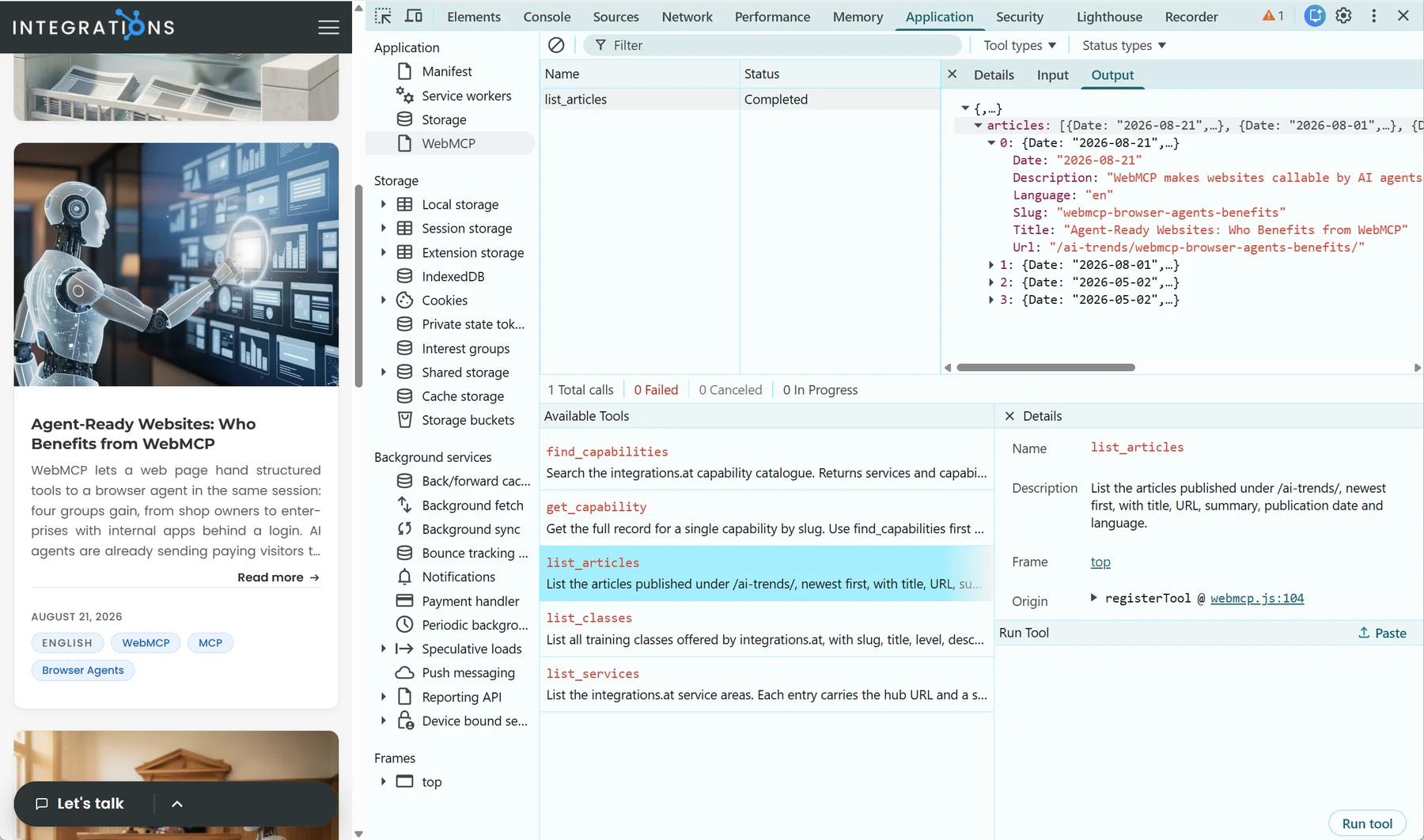
Testing it needs no AI agent at all. Open DevTools, go to the Application tab and select WebMCP in the left sidebar. Available Tools in the lower half lists everything the page registered, with each tool’s description, so it is also the fastest check that a tool registered at all. Selecting one opens Details on the right: name, description, the frame it belongs to, and an Origin link straight to the line of source that registered it. The Run tool button sits at the bottom right of that pane. The Input tab takes the tool’s arguments as JSON ({} for a tool that takes none), and Output shows the result as an expandable tree, the same thing an agent receives. Every run lands in Tool Activity at the top with its status and a running count of total, failed and cancelled calls. The console does the same job for anyone who prefers it: await document.modelContext.getTools() lists the tools and document.modelContext.executeTool(tool, '{}') runs one, with Chrome taking that input as a JSON string even though the draft IDL says object.
With the flag on, this is testable here. Open a page on integrations.at, open the WebMCP panel and run list_services with {}: the four areas and their cards come back as data. Then open a page carrying the Knowledge Catalogue and run apply_knowledge_catalogue_filter with a query. The list on screen narrows while the same result is returned to the caller: read and act, on the site you are already reading.
Sources
- AI traffic to US retailers rose 393% in Q1, and it's boosting their revenue too
- WebMCP
- Join the WebMCP origin trial
- Microsoft Edge Origin Trials: WebMCP
- Why now is the time to prepare for WebMCP
- Gartner: AI agents will command $15 trillion in B2B purchases by 2028
- WebMCP support for Liquid and Hydrogen storefronts
- AI-referred shoppers convert better and spend more
- Give any website a WebMCP interface
- Improvements to Web for AI Should Benefit All Users
- WebMCP: Efficient AI-Native Client-Side Interaction
- WebMCP: Making Every Website a Tool for AI Agents
- Get started with origin trials
- WebMCP - Model Context Tool Inspector


