
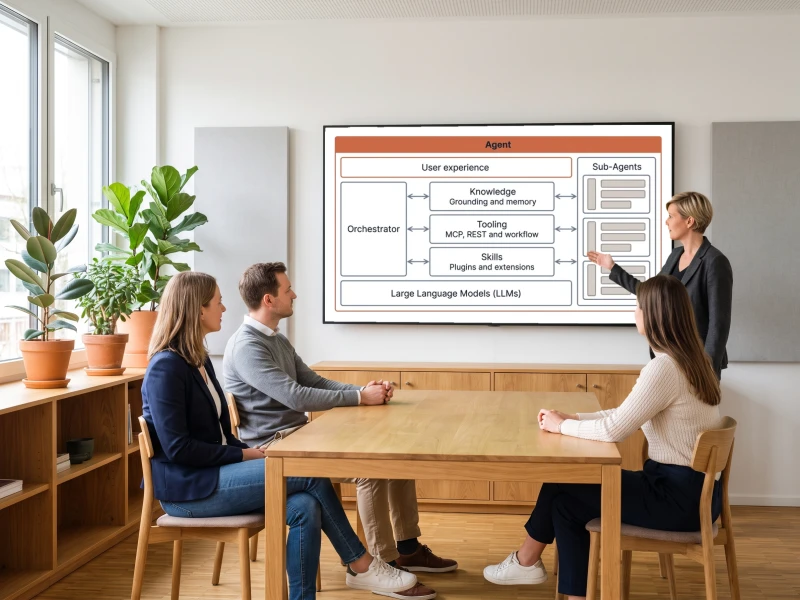
Four Building Blocks

The Microsoft Agent Framework brings four building blocks together: Agents, which call tools and MCP servers and support multiple model providers, the Harness Agent with planning, context compaction, file access and tool approval, Workflows as functional and graph-based execution paths, and Integrations to model providers, tools and UI frameworks.

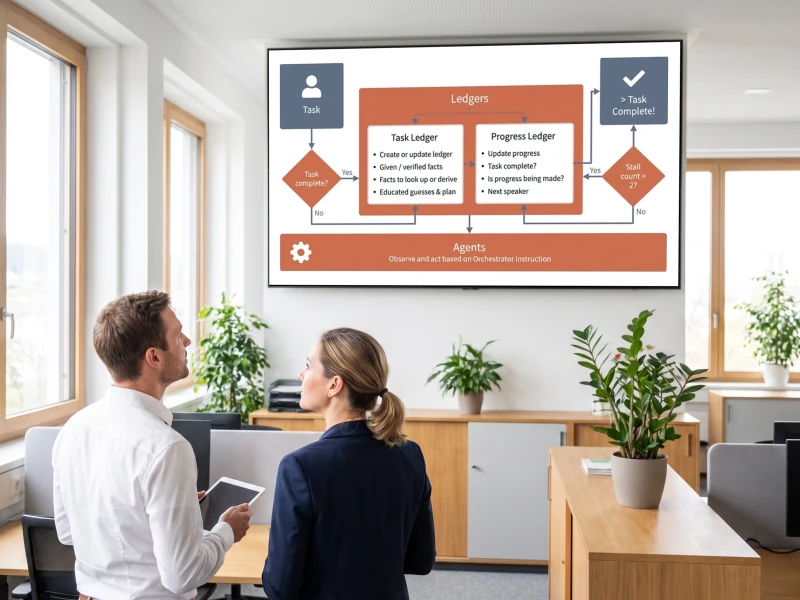
Five Orchestration Patterns

The Microsoft Agent Framework brings five orchestration patterns: Sequential, where agents run one after another, Concurrent, where they work in parallel, Handoff, where they transfer control based on context, Group Chat, where they coordinate in a shared conversation, and Magentic, where a manager agent dynamically coordinates specialized agents.

State and Human-in-the-Loop

Workflows checkpoint their progress at superstep boundaries and support fan-out and fan-in execution, across both workflow APIs, functional and graph-based. Human-in-the-loop runs through tool approval and request info: agents use approval-required tools that pause the workflow until a person reviews them before execution.
Progress Stays Saved
a run that outlasts your session still picks up exactly where it paused
Cost Visible Live
each pipeline stage shows its own spend, streamed live while the run is still going
API Already Works
the REST API you run today becomes the tool an agent calls, unchanged

Enterprise Multi-Agent System

Four Building Blocks 2 steps
01

Agents, Harness and Workflows

Agents call tools and MCP servers and support multiple model providers. The Harness Agent brings planning, todo tracking, context compaction, file access and memory, and tool approval. Workflows connect both through functional and graph-based execution paths.
02

Model Clients, Sessions and Middleware

Model clients for chat completions and responses, an agent session for state management and context providers for agent memory round out the four building blocks, available for .NET, Python and, in preview, Go. Middleware intercepts agent actions, and MCP clients wire in tools directly.
Five Orchestration Patterns 2 steps
03

Sequential, Concurrent and Handoff

In Sequential, agents run one after another in a fixed order. In Concurrent, they work on the same task in parallel. In Handoff, they transfer control to the next agent based on context, with no central manager steering every step.
04

Group Chat and Magentic

In Group Chat, agents coordinate in a shared conversation. In Magentic, a manager agent dynamically coordinates specialized agents instead of following a fixed sequence. Both patterns support human-in-the-loop through tool approval.
State and Human-in-the-Loop 2 steps
05

Checkpoints at Superstep Boundaries

The graph-based Workflow Builder connects typed executors through edges and conditions, supports fan-out and fan-in execution, and checkpoints progress at every superstep boundary. Workflow and executor events make every step observable.
06

Approval Through Tool Approval

Agents use approval-required tools that pause the workflow until a person reviews them before execution. Request Info gathers additional human input mid-run, through RequestInfoExecutor in the graph-based workflow or ctx.request_info() in the functional one.

Frequently Asked Questions

What is an agentic business process?
It is a process where the agent does the reading, the matching and the drafting, and a person owns the approval. One delivered example takes the monthly Excel worklist the office already produces, matches the buildings, and proposes a full month of technician routes grouped by location with real driving times from Google Maps. Not one record is saved until someone reviews the proposal, and every run keeps a history entry that explains the result later.
What makes an agentic process operable rather than a demo?
An agentic process in production needs three things a demo typically skips: a shared ledger that keeps state when a run outlasts a session, a cost record per stage so spend stays attributable, and a written-down failure mode for every platform behaviour that contradicts its own documentation. The Microsoft Agent Framework 1.0 supplies the ledger. Microsoft Foundry Hosted Agents supply per-session isolation and scale-to-zero so long runs do not hold infrastructure warm. The Agent Harness carries automatic context compaction and OpenTelemetry tracing to Application Insights, so the failure path that surfaces on the third run does not recur on the fourth.
How do agents reach business data without rebuilding the system?
Through Model Context Protocol on top of the API that already exists. One planning platform exposes seven schedule tools over its live database, with tool descriptions written in the office's own German vocabulary so fuzzy employee and building names resolve correctly, connected to Claude as a custom connector. Staff ask who has an appointment on a given date instead of opening the planner. The connector runs against the staging slot before it is pointed at production.
What stops an agent from writing something wrong into a system of record?
The model is not given the write path. In the delivered pattern it produces a draft and returns an interactive form rendered inside the chat client, and that form calls the single save tool behind it. Document intake works the same way: an extracted record carries a review flag and the source document stays archived in blob storage until a person confirms it. Approval is a step in the system, not a habit people are asked to keep.
Who decides which model runs, and what does a run cost?
An administrator does, in a model registry with a default per use case and AI credits granted per user. The effect is measurable: on one drafting feature a model change made suggestions roughly ten times faster and four times cheaper without touching the feature. Cost stays visible at the run level too, because each pipeline stage writes one JSON line with its token cost, and the same trace streams to the screen as a live readout.
What happens when the platform does not behave the way the documentation says?
It gets diagnosed once and recorded. Magentic teams on Microsoft Foundry fail against the Responses API with a manager ledger error, and the working configuration is the Chat Completions client. That finding now lives in the harness that travels with the codebase, alongside the deployment run-book and the conventions. Knowing the failure modes of a platform is a large part of what makes a second project on it faster than the first.