
Microsoft Autopilot

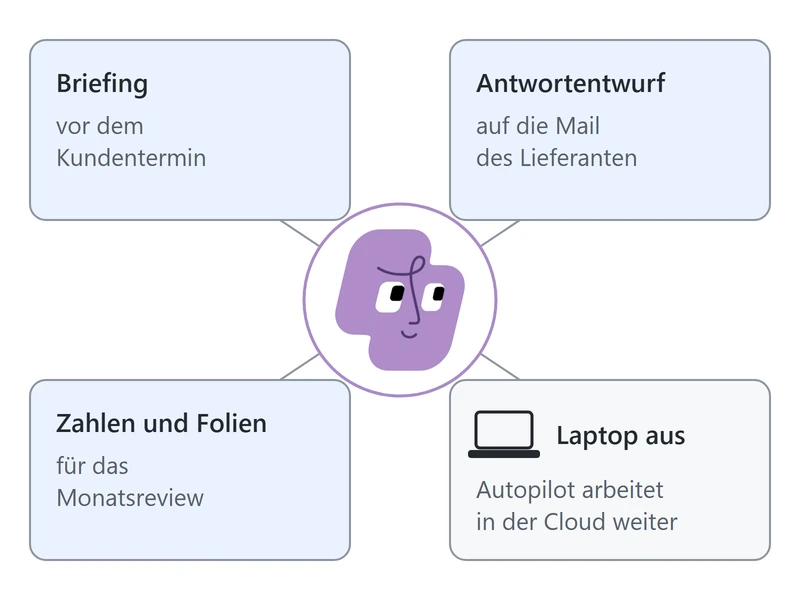
Autopilot is the personal teammate in Microsoft Copilot, one per person. The agent takes over the follow-up work: briefings before customer meetings, draft replies to supplier mail, figures and slides for the monthly review. Autopilot keeps working while your laptop is off. Microsoft advises treating the agent like an employee.
Autopilot and Cowork

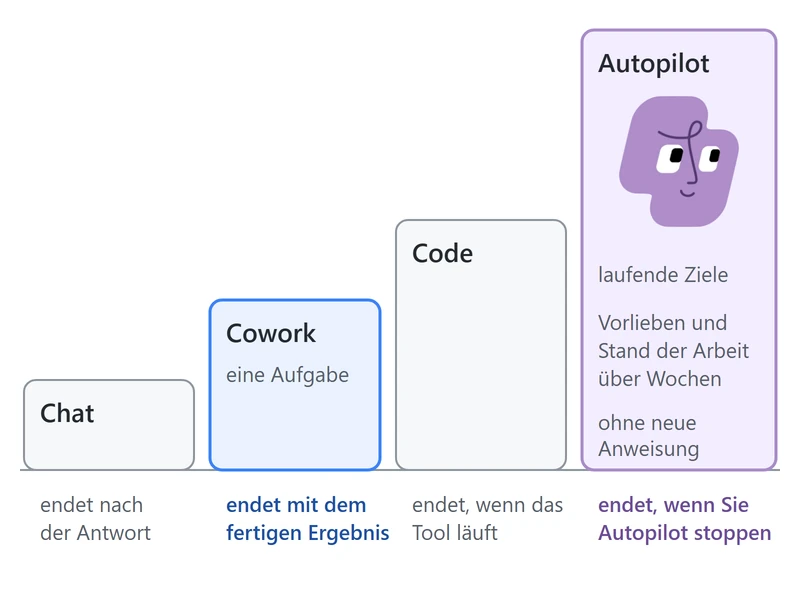
In Microsoft Copilot, Autopilot comes after Chat, Cowork and Code. The agent works on your ongoing goals beyond the finished result of a Cowork task, until you stop Autopilot. Your preferences and the state of the work stay with the agent for weeks, longer than a Cowork task. Follow-up continues without a new instruction.

Crosscheck and Approvals

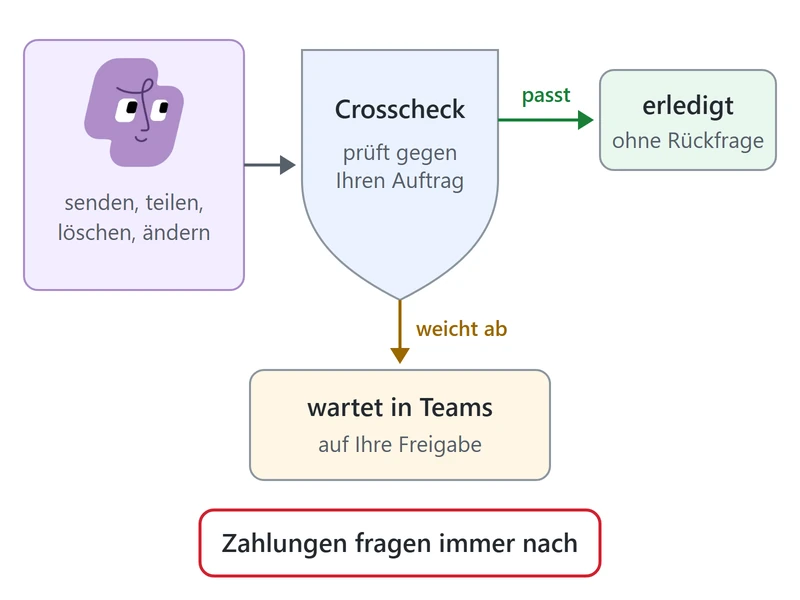
Consequential actions by Autopilot stay in your hands. Before the agent sends, shares, deletes or changes anything, Crosscheck compares the action with your brief, independently of Autopilot. The agent carries out matching actions without asking. An action that deviates waits in Teams for your approval. Payments always ask first.

From Brief to Ongoing Work

Setting Up and Briefing Autopilot 2 steps
01

Name, Role and Goal

Each employee sets up a personal Autopilot in their own words, with a name, a role and a goal, for example for the canteen supplier review. Autopilot suggests matching recurring tasks. After 10 to 30 minutes the agent is ready to work.
02

A Brief With Boundaries

The brief reads like a handover to a new colleague: the result, the sources, the boundaries and where the results go. For the canteen, that means on-time deliveries, replies sent after your approval and a summary in Teams.
Autopilot Keeps the Work Moving 2 steps
03

Recurring Work

Autopilot handles recurring work on a schedule, such as every weekday at 08:00, or as soon as a supplier mail arrives. When a delivery moves, the agent updates the supplier list and reports when Friday's menu is at risk.
04

Results and Overview

Results land where your team works: in the supplier list, the document, the invite. That is where you check progress. An overview in Copilot shows running work, open questions for you and completed tasks.
Approvals and Team Collaboration 2 steps
05

Approvals in Teams

Before Autopilot replies to a supplier or invites another person, the agent asks you in Teams. The overview in Copilot collects open questions. One reply releases the action. The boundaries in your brief are part of the protection.
06

Autopilot in the Team

Colleagues address your Autopilot in Teams like a person, for example for a decision document and a meeting. The agent proposes a free slot, books the meeting once you agree and shares the document. You decide who may talk to the agent.

Frequently Asked Questions

What is Autopilot?
Autopilot, formerly Scout, is a person's always-on agent in Microsoft Copilot. You reach the agent in Copilot on the Home tab, in Teams, in Outlook and in the mobile apps. Autopilot works in the cloud until you stop the agent.
When does Autopilot fit, and when Copilot Cowork?
Copilot Cowork fits a task with a finished result, such as follow-ups and a summary of a canteen's late deliveries. Autopilot fits work that keeps going, such as the supplier review every weekday at 08:00 with a message in Teams when a delivery puts Friday's menu at risk.
When is Autopilot available?
Autopilot is a Frontier preview and off by default. The rollout to Frontier tenants started on November 17, 2026, first in the United States and optimized for English. A date for general availability is pending.