

Start With Copilot Studio

Copilot Studio is built on three harnesses: the GitHub Copilot harness for multistep, judgment-based processes, the standard harness for rule-based, predictable conversations, and the Copilot chat harness, which extends Microsoft 365 Copilot Chat with your own knowledge. Agents can be distributed across Teams, the web and enterprise applications, and connect to connectors, REST APIs and MCP servers.

Prompt Agent or Hosted Agent

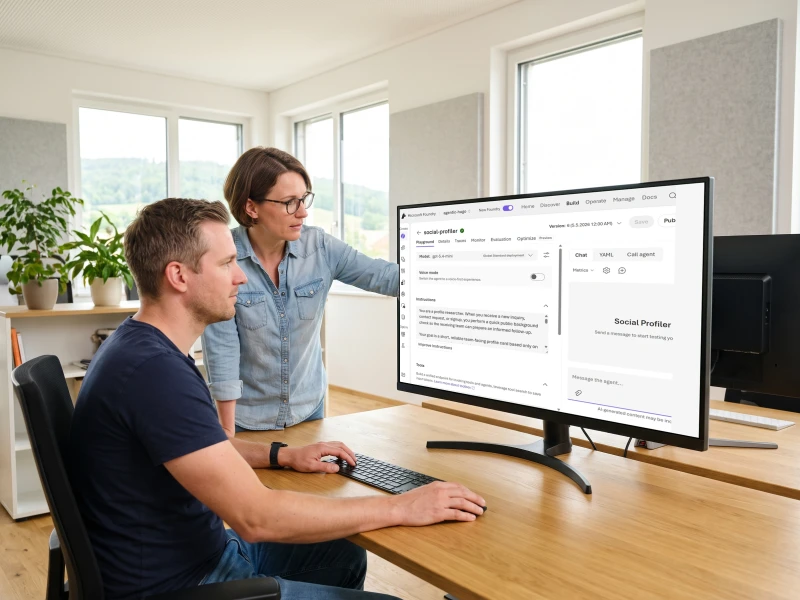
Microsoft Foundry offers two agent types. The prompt agent is the fastest path: you configure instructions, model and tools, and Foundry runs the agent with no code or infrastructure. The hosted agent gives full control: you bring your own code and framework as a container, and Foundry provides a managed endpoint, autoscaling and a dedicated Entra identity.

From Prototype to Publishing

The Foundry development lifecycle runs from create through test, trace and evaluate to optimize, publish and monitor, with automatically versioned snapshots and rollback to any previous version. Agents publish to Microsoft Teams and Microsoft 365 Copilot, with a dedicated Entra identity, private networking, role-based access control and content filters per agent.
Team Updates It
the business team that owns the Copilot Studio agent updates it directly; every change stays inside the department
Full Code Control
your own code and framework run as a container; Foundry manages the endpoint, autoscaling and Entra identity
Fastest Path
the prompt agent runs from instructions, a model and tools; Foundry handles the code and infrastructure

From Copilot Studio to Microsoft Foundry

Start With Copilot Studio 2 steps
01

Three Harnesses for Three Scenarios

The GitHub Copilot harness thinks through multistep business processes and adapts when circumstances change. The standard harness follows defined topics for predictable answers. The Copilot chat harness extends Microsoft 365 Copilot Chat with your own knowledge.
02

Distribute Across Channels and Tools

Agents can be distributed across Microsoft Teams, the web and enterprise applications. They connect to your systems through connectors, REST APIs and MCP servers, call workflows, and hand off tasks to other agents instead of finishing everything themselves.
Prompt Agent or Hosted Agent 2 steps
03

Prompt Agent: The Fastest Path

You configure instructions, a model and tools, and Foundry runs the agent with no code or infrastructure. Portal-first, the agent takes shape interactively in the Foundry portal; code-first, it is defined through the SDK or REST API in your deployment pipeline.
04

Hosted Agent: Full Control

You bring your own code, built with the Microsoft Agent Framework, LangGraph, the OpenAI Agents SDK, or your own code. Foundry provides a managed endpoint, automatic scaling and a dedicated Entra identity per agent.
From Prototype to Publishing 2 steps
05

Test, Trace, Evaluate

In the agents playground, you chat with the agent or run it locally, with MCP servers testable directly. Every model call and tool call can be traced, and evaluations measure quality and catch regressions.
06

Version and Publish

Every iteration is automatically captured as a version, with rollback to any previous version and a comparison between versions. Published agents run through Microsoft Teams, Microsoft 365 Copilot and the Entra Agent Registry.

Frequently Asked Questions

When does a workload need the Microsoft Agent Framework rather than a hosted agent service?
The deciding factors are lifecycle and coordination. A hosted agent service on Microsoft Foundry fits when a team of agents has its own release cadence and the orchestration stays inside one bounded service. The Microsoft Agent Framework earns its cost when several agents must coordinate across a long-running workflow, with durable state between steps and human approval gates mid-run. The 2026-04-03 GA consolidated AutoGen and Semantic Kernel into one surface: code written before that date may be on an API the framework has since absorbed.
What makes platform decisions go wrong?
Most re-decisions trace to the same two causes. The first is naming the platform before the workload profile exists: the data residency, the identity model and the change-ownership question are answered by the platform before a single line of code is written, so choosing the platform first means accepting whatever those answers happen to be. The second is choosing without writing the reason down. When a vendor retires a feature or a regulation changes, a bare choice cannot be reviewed against the conditions that produced it.
What is Microsoft Foundry retiring, and why does it matter now?
Microsoft Foundry is retiring its own workflows feature on 2026-12-01 and directing new work to the Microsoft Agent Framework. For any agentic workload currently on Foundry's native workflow engine, the practical question is whether the migration to the Agent Framework is better done now or forced by the deadline. The Agent Framework reached 1.0 GA on 2026-04-03 and is MIT licensed. That is a stable target. A decision written with a reason will make the migration rational; one written without a reason will make it exploratory.
How observable does an agentic pipeline need to be?
Observable enough that a stalled run can be diagnosed without reading business logic. Results stream as server-sent events with response buffering disabled on the .NET side, so the run is not a black box while it is in flight. Every pipeline stage writes one structured JSON line carrying an AsyncLocal correlation id, which makes per-run cost and the full failure path readable after the fact. Both choices belong in the decision record: the next person to instrument a new stage needs to know which pattern the pipeline already uses.
What does the written decision look like in practice?
A file in the repository, not a separate document. It names the workload, the four qualifying question answers, the platform chosen, the reason at the time of decision, the alternatives considered and ruled out, and the condition set that would change the answer. The condition set is what turns a static record into a living one: when a vendor retires a capability or a data residency rule changes, the record tells a reviewer exactly what to check. A decision that lives in the repository travels with every clone of the codebase.